Titles.

I have never been a fan of corporate titles. I always thought they were silly. For me, all I care about is (a) how much power do I have to drive direction, (b) how many people do I have to worry about making sure they do their stuff, and (c) how much money do I make. Title can hint at these things, of course, and title does matter to recruiters who are less likely to promote you as a “Principal Software Developer” if your previous title was “Software Developer”, even if you have 20 years experience.

So today I’m happy. I believe on my business cards I’m about to get the title of “Guru of Code-Fu.”

Kings of the “closed” discuss “openness”

What happens when a bunch of executives for corporations who pioneered closed devices running siloed and proprietary operating systems, who work and-in-hand with corporate providers who are famous for running “walled gardens” suddenly have their lunch handed to them by a corporation who made a better device, which is easier to develop for, who allows anyone to download the developer tools for free (rather than charging between several hundred and several tens of thousands for the dev tools), and allows anyone to sign software for a nominal fee?

Simple: these Kings of Silos, these Grounds Keepers of the Walled Gardens, these Maintainers of Closed Ecosystems bitch about the lack of “openness” by the latecomer who changed the rules for the better.

Apple is top of mind for execs at MWC

The panel which included three of the most powerful CEOs in the mobile industry–Ralph de la Vega, CEO of AT&T Mobility, the second largest mobile operator in the U.S.; Olli-Pekka Kallasvu, CEO of Nokia, the world’s largest handset maker, and Steve Ballmer, CEO of Microsoft, the worldwide software leader–centered on the need for more openness to spur successful innovation in the mobile market.

But the discussion quickly devolved into the need for openness, despite the growing success of Apple, considered the most closed player in the industry.

The most closed player in the industry? Are you fucking kidding me?

Yes, Google has an even more open operating system, the Android, for mobile phones. But at the moment Android is a marginal player.

And who are the other principles on the stage at MWC? AT&T Mobility, who imposed the closed restrictions on Apple in order to allow Apple to play in their closed walled garden, Nokia, who until recently charged some serious change to use the Symbian development tools, and still features the Nokia Pro premium service which is invitation only, and who charges twice as much as Apple to allow you to sign an application for distribution. And Microsoft, who still charges serious change for the correct version of Virtual C++ to develop Windows Mobile applications, and who used to charge per signing for signing applications–including those being signed for beta testing.

I just don’t get it.

What’s funny is that only recently did Nokia make their development environment free–but that doesn’t overcome the fact that Symbian is still a nightmare to develop for. (Really, who ships a mobile operating system with two–count them, two user interface APIs?) And Microsoft’s Windows CE is, um, ah, well, like a walk down memory lane: if you were a Windows 95 developer a decade ago, you’ll be right at home in Windows CE–aside from the odd restrictions and, um, clumsy ways of handling display windows.

The real irony of all of this, however, is the following quote from Ballmer:

“I agree that no single company can create all the hardware and software,” he said. “Openness is central because it’s the foundation of choice.”

Erm, is this supposed to be a hidden slight at Apple, who just ate Windows CE’s lunch in the United States and is poised to eat Symbian’s lunch (except for the most stripped down no-feature underpowered phones) in Europe.

I’m just amazed that these idiots, in their whole drive to make sure they didn’t become as pointless in the mobile world as Earthlink became in the wired world, left such a huge chunk of change on the table that it took an upstart and a nearly bankrupt walled gardener who was desperate for a hit to show folks how things could be done–and essentially create demand in a segment that until recently was a fringe marketplace. After all, until the iPhone came out, how many people were willing to pay $300 for a phone that also involved a two year, nearly $60/month (for the most basic service) service contract? Pre-iPhone, mobile phones were giveaway devices that were given to you for free as part of your service contract.

We used to make things.

I remember a time when we used to make things. Duvac in Pasadena used to carry wire wrap supplies and integrated circuits. Fry’s used to have a wide selection of products for making circuits that weren’t contained in packaging that yellowed with age. You could buy Nixie displays from Radio Shack.

Perhaps it was a matter of economics: if you wanted a home computer on the cheap you needed to make it yourself. Perhaps it was a matter of tinkering: back then, you had to build your own stuff, while today “tinkering” involves playing with PHP and building your own web site. Or perhaps it’s simply just a matter of a culture which wants things faster, better, cheaper–and when you can buy a really cool computer or GPS gizmo with full color display for under a couple of hundred bucks, who wants to spend a thousand to get a small box with a handful of LEDs that flash?

But no-one seems to make things anymore. Which is a shame.

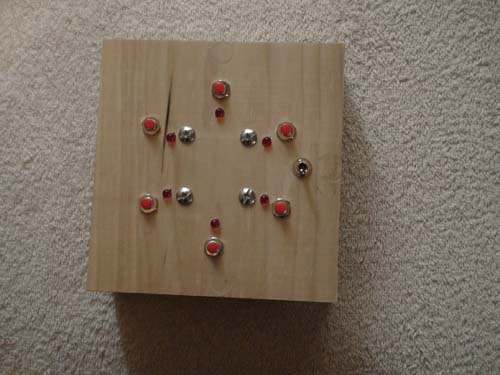
So in my spare time I decided to build a Simon-like game clone–because I can.

Here’s the circuit diagram: game circuit diagram, and here’s the source kit for SDCC for the software for the game: game source kit. The final ROM size is 1193 bytes, well under the 4K limit for the HC08QY4. (With some work it probably could be made to fit in less than 1K, suitable for the HC08QY1, which in quantity is around $1/unit.)

Update: There is a typo in the diagram. The CPU used is the MC68HC908QY4, not the QT4. The QY4 is the 16-pin version, and what is shown is the 16-pin DIP version of the circuit. The QT4 is the 8-pin version of the same processor.

Here are some pictures, including the box I made to hold the game:


And here’s a video of the game in action.

The source files uses SDCC for compiling the source kit from C to assembly language. There were a few gotchas that occurred while making the game:

(1) While the SDCC documentation says if you use the __interrupt(N) keyword an appropriate interrupt entry will be entered into the interrupt table of the HC08 processor, I found that for some reason the entry wasn’t added after all. Thus, the interrupts.s file actually provides the correct entries into the interrupt table. If you add a new interrupt, you should then update the interrupts.s file to reflect the new interrupt.

(2) I use stack variables rather than globals; this is because the underlying architecture is interrupt driven. In events.c I use the timer interrupt (configured to interrupt every 1/100th of a second) to poll the keyboard and generate key up/key down events, as well as fire off an event. This architecture is perhaps a little overkill, but it does allow me to respond to very complex logic without worrying if the logic fits in a 1/100th of a second window. Further, this has the advantage that in my GetNextEvent() routine, if there are no events taking place, I can place the processor into a low-power WAIT state, which reduces considerably the amount of power drawn by the device.

The overall advantage of this is that the game runs just fine on a couple of AA batteries. And I expect that, during game play when no lights are turned on, the total draw of the circuit should be on the order of 1.1mA. By contrast, the biggest draw are the LEDs.

I love the interrupt-driven architecture, by the way: if the same architecture were to wait for key strokes using the keyboard interrupt architecture–for example, we were using this chip for a keypad for a combination lock–we could put the processor into STOP mode. Without any external circuits being powered, in STOP mode the QT4 draws 0.36µA of power–meaning it could run in this standby mode on a couple of AAs for nearly 22 months.

The stack-based variables, however, is so I can keep everything straight, since in theory any routine could be re-entrant.

But this means that many of the built-in run-time libraries for the HC08 on SDCC don’t seem to work right. My random number generator deals with the reality that in-line long integer multiply drops to a library call–so it doesn’t work right at all. However, a long-integer shift does work correctly, so I implement the GNU random() number generator algorithm using shifts and adds in C, which then generates the right (non-library calling) routine.

(3) There is no sound. That’s because I didn’t have access to a small speaker. I intend to fix this with a future version when I have some time. When I do this, I’ll probably use the same interrupt loop (slightly tweaked) to drive the speaker to seven different sounds: one for each position, and an “you fail” sound. (One possibility would be to tweak the interrupt timer duration and adjust all the timing of the rest of the game to match. Another would be to up the interrupt timer frequency, and maintain two additional counts: one which indicates if I pull up or down the speaker line, and another which indicates if I should drop into my old 100Hz interrupt routine.)

(4) The animations are perhaps a little over the top. With sound I probably could simplify the startup sequence. I also wonder if I shouldn’t add a seventh ‘start’ button to start the game instead of using the “hit any button to start” method I’m using now.

(5) Why are the lights so strange, with D1 being the lower right LED? Because I got disoriented when I was hooking up the LEDs: my intention was to make D1 the top light, with other lights working clockwise around. Instead, I wired up LED 6 as the lower light, with the other lights working counter-clockwise–meh. It was easier to rework the software than re-glue the lights. I worked the switches in the same order deliberately so I didn’t get confused.

Sure, it’s a silly little gizmo with a handful of lights. But I had fun!

Valid format values for declare-styleable/attr tags

Meh. Wasted an hour trying to sort this out.

The answer happened to be buried in some Android code. The fact that Android is open source is a cool thing–but I shouldn’t have to dig through that source kit just to figure out the answer to something that could be better documented.

When declaring a <declare-styleable> <attr> tag, you supply a name for the new attribute for your custom class, and you provide a format. Well, I couldn’t find the valid values for the format attribute in the documentation. But I did find them here.

And those values?

  • reference
  • string
  • color
  • dimension
  • boolean
  • integer
  • float
  • fraction
  • enum
  • flag

It also appears from the source code that this field is optional, and I presume if it is left blank, either one of two things will happen: this will default as a resource reference, or the format is only used for type checking, and this can be any value. I dunno; I haven’t tried it.

On the off-chance someone knows the answer, could they leave it in the comments?

Things wrong with the Google Android UI

It has been my experience that most software developers, and many product managers for that matter, have absolutely no sense of UI design. After playing a little bit with the Google Android Dev phone, the following things immediately jump out at me that are just wrong about the gPhone.

(1) How many different ways do you need to get your e-mail?

On the home screen you have the “Browser” icon which takes you to the mobile version of Google, where at the top there is an e-mail tab. To your typical user, this is the way you get your e-mail. Buried under the tab which reveals all the applications beyond the basic 4, you also find a Gmail program which can be used to get your Google e-mail, and an Email application which can be configured to get your Google e-mail via IMAP.

Do you need three separate and equivalent (in terms of number of taps) ways to get your e-mail?

Yes, the first two methods only get your Gmail; the last tool can be configured to get other e-mail. But honestly, would it hurt to have a unified e-mail mechanism?

(2) Incoming messages are not obvious.

When you get an e-mail, the upper left status bar shows a small icon representing the fact that you have a new message. It’s unclear what that icon represents: how am I supposed to know a little ‘@’ sign means I have new mail?

What’s odd about the incoming message status bar is that behind that status bar, if you touch the top bar and slide down to the bottom of the phone, is hidden a notification system which tells you of all of your incoming notifications. But there is nothing on the bar indicating that it can be slid down like this!

Meanwhile the front of the phone has a ton of screen real estate being devoted to–displaying a blue ocean scene.

(3) There is no clear indication in the application launcher icons (hidden by the tab at the bottom of the display) as to which applications have received a notification.

On the iPhone, a small badge is used in order to determine if there are messages associated with an application; thus, if you have waiting SMS messages, the SMS icon has a number indicating the number of messages. Similarly for e-mail.

The Google phone, however, does not provide any such indicator: if you get a message you can launch the application that handles that message by clicking the notification line in the notification window (if you’re smart enough to divine the fact that a notification window can be found there), but otherwise, all you know is the phone rang, a little mail icon (for SMS) or @ sign (for e-mail) is sitting in the upper corner, and God knows which application you should open to handle the messages.

(4) There is no note taking system for the Google phone.

Yeah, people bitched when there was no to-do list manager on the iPhone, and that makes sense to me: you have a to-do list in a synchronized Calendar, so why can’t I get that to-do list on my phone? But the Google phone doesn’t even have a notepad. A big, beautiful keyboard and no way to take notes?

Yes, you can download third-party notepads to the Google phone, just as you can download third-party to-do programs on the iPhone. But seriously…

(5) Likewise, as a video player, you can play–YouTube videos.

Thanks. But I’d like to watch the latest episode of Battlestar Galactica.

(6) When the phone turned on from sleep, the display shows status, the network, the time (as a digital display) and a message to press the menu key to unlock the phone. Once the phone is turned on, you go to a primary screen with four icons–dial, contacts, browser and maps–and a beautifully rendered analog clock.

But here’s the thing. Say I’m pulling the device out of my pocket and checking the time. I’ll press a button, see the digital time, then let the display go to sleep again.

If I bother to unlock the phone, I’m going to use an application–either I’m going to make a phone call or I’m going to run a Tetris clone. So why force me to go through three taps–the third to expand the launcher–in order to play a game?

I suggest the analog clock in the middle of the display is completely useless: the time is also displayed in the upper left corner–and the only reason why I can see for having a beautifully rendered analog clock and a digital clock on the same screen is because Google thinks I’m 5 years old and still learning what the big hand means and what the little hand means.

Apple solves this problem by having a row of icons clearly delineated at the bottom of the screen that are fixed from screen to screen: the ‘Phone’ (which includes the contacts list), ‘Mail’ (and not three separate mail programs), ‘Safari’ (for browsing) and ‘iPod’ (for playing music and videos). But rather than wasting the rest of the real estate on the top of the display with a useless clock and a pretty seascape, the iPhone displays a 4×4 grid of other applications you may wish to run.

Yes, I know these are minor nit-picky minor things–perhaps nearly not worth even noting. But that’s the whole point of user interface design: there needs to be a coherent whole, some unified thought, a way to clearly indicate to the user using a consistent symbolic visual language what to do. When I see an icon in a rectangle I know if I touch it something represented by that icon will happen.

But Google has violated a number of these things: how am I supposed to know that by sliding the top down I’ll get the notification manager? And why–outside the possibility of separate development teams competing on providing e-mail and not talking to each other–is there three ways to get my e-mail?

And that’s the point: each of these tiny little pointless and nearly irrelevant little nit-picky things are exactly those things that turn a good user experience into a insanely great user experience.

And the Google phone: it’s good. Better than Windows Mobile.

But it’s not insanely great.

So you have an iPhone 3G and want to use the SIM on the Google Android dev phone.

The steps I found on the ‘net seems to work.

Remove the SIM card from your iPhone and insert it into the Google Android developer phone. When you start the phone for the first time, when the phone asks for your Google account, you need to press the menu button, and select “APN”. Add a new APN entry on the Dev phone with the following settings:

Name: att
APN: wap.cingular
Password: CINGULAR1

All other fields are left blank. Click menu, save, then work your way back to the login prompt, and sign in as usual.

It appears the good news is that once you get the phone set up, it will operate (albeit without phone or 3G wireless) without the SIM card, which makes the phone useful in a limited fashion for development. And if you do need to test the card on 3G, you can just move the SIM card back–though unfortunately it’s a real pain in the ass to extract the SIM card from the Google phone without tweezers. (On the other hand it’s impossible to remove from the iPhone without a pin, so I guess they’re even.)

h/t

Centering the contents of a component in a JScrollPane

When creating a drawing program it’s nice to be able to center the contents of your view if the content area of the JScrollPane is larger than the contents of your document. By default your contents are slammed to the upper-left; however, by using the Scrollable interface you can prevent the viewport containing your content view from shrinking smaller than the content area of the scroll pane, thus allowing you to do things like center your content.

Here is some code which I used to do this. I’m posting the code here so I can remember this in the future.

First, the class itself:

public class ContentView extends JComponent implements Scrollable
{
    private int width = 500;    // document width, height. (replace with whatever code you use to find these values.
    private int height = 400;
    private Rectangle offset;   // caching code; see discussion below.

I’m declaring a width and height inside my class for demo purposes., but you can obtain the visible width and height anyway you wish.

Now the centering code:

    /********************************************************************************/
    /*                                                                              */
    /*  Viewport Centering                                                          */
    /*                                                                              */
    /********************************************************************************/
    
    /**
     * Internal routine which computes the smallest rectangle size
     * encompassing the document area and the scroll viewport.
     */
    private Dimension getViewportSize()
    {
        Dimension size = getParent().getSize(); // get my viewport size

        int xsize = size.width;
        if (xsize < width) xsize = width;
        int ysize = size.height;
        if (ysize < height) ysize = height;
        
        return new Dimension(xsize,ysize);
    }
    
    /**
     * getMinimumSize returns the smallest acceptable size of this view. This
     * is then used resize
     */
    public Dimension getMinimumSize()
    {
        return new Dimension(300,200);
    }
    
    /**
     * The getPreferredSize routine returns my preferred size; this returns the
     * viewport size
     */
    public Dimension getPreferredSize()
    {
        return getViewportSize();
    }

    /**
     * The Scrollable.getPreferredScrollableViewportSize routine returns the suggested
     * size of the viewport. This will return the viewport size I want, which is
     * the larger of the view area size and the existing viewport size
     */
    public Dimension getPreferredScrollableViewportSize()
    {
        return getViewportSize();
    }


    public int getScrollableBlockIncrement(Rectangle visibleRect, int orientation, int direction)
    {
        int x;
        if (orientation == SwingConstants.VERTICAL) {
            x = visibleRect.width - 12;
        } else {
            x = visibleRect.height - 12;
        }
        if (x < 12) x = 12;
        return x;
    }

    public boolean getScrollableTracksViewportHeight()
    {
        return false;
    }

    public boolean getScrollableTracksViewportWidth()
    {
        return false;
    }

    public int getScrollableUnitIncrement(Rectangle visibleRect, int orientation, int direction)
    {
        return 12;
    }

The core of the code above is the getViewportSize() routine, which determines a size which contains the size of my content and the viewport size. This is then returned for the getPreferredSize and getPreferredScrollableViewportSize() routines–both are used by the JScrollPane to resize my view within the scroll view area.

The routine getMinimumSize() is used to return the minimum acceptable size. To make a long story short, in my custom LayoutManager, I call the JScrollPane’s getMinimumSize() routine to get the minimum area allowed for resizing my window; this makes sure the contents area of my scroll bar doesn’t shrink below the minimum size returned.

The other interface methods for the Scrollable are filled in with acceptable defaults for a drafting program: page scrolling scrolls almost the entire width or height of the visible area, and clicking the arrows steps 12 pixels.

Now to hang all this together you need to then draw the contents in the right place; this means you need a rectangle representing the content area of your document.

    /********************************************************************************/
    /*                                                                              */
    /*  Drawing Support                                                             */
    /*                                                                              */
    /********************************************************************************/

    /**
     * invalidate is called when the size or boundaries of this thing has been
     * invalidated. This resets my offset rectangle because I will need to recalculate
     * it.
     */
    public void invalidate()
    {
        super.invalidate();
        offset = null;
    }
    
    /**
     * getOffset calculates (if needed) and returns a rectangle which defines the
     * location of my drawing in my view. If the visible area of my view is larger
     * than my drawing, this will return a rectangle offset appropriately
     * @return
     */
    public Rectangle getOffset()
    {
        if (offset == null) {
            Dimension parentSize = getParent().getSize();
            int xoff = (parentSize.width - width) / 2;
            if (xoff < 0) xoff = 0;
            int yoff = (parentSize.height - height) / 2;
            if (yoff < 0) yoff = 0;
            
            offset = new Rectangle(xoff,yoff,width,height);
        }
        return offset;
    }
    
    protected void paintComponent(Graphics g)
    {
        Rectangle r = getOffset();
        Dimension size = getSize();
        
        // erase to background
        g.setColor(Color.lightGray);
        g.fillRect(0, 0, size.width, size.height);
        
        // erase my document area
        g.setColor(Color.WHITE);
        g.fillRect(r.x, r.y, r.width, r.height);
    }

The offset field above is used to cache the current offset and location of my contents in my drawing area; I cache this value so I’m not constantly recomputing this on a mouse down/move/up cycle. The calculation itself is handled in getOffset(). The invalidate() method is called by the OS whenever the size of my view is changed; this allows me the chance to dump the previously cached value to force a redraw.

And the paintComponent() routine will repaint the contents; here I draw the area as a white area within the content area.

As a footnote, if you write code to recalculate the location of the scroll bar and use that code to calculate the minimum acceptable size of your view, your LayoutManager should use getMinimumSize rather than getPreferredSize when determining the size for scrolling. (I’m lazy; my LayoutManagers use the same value for preferredLayoutSize and minimumLayoutSize.) Otherwise, you will find the window constantly resizing itself larger and larger as the custom getPreferredSize() above interacts poorly with the resize code.

Look; this is a hack. I make no promises this works correctly; standard disclaimers apply.

Embedded Software

You know embedded software and embedded microprocessors are everywhere when you find a reference design for an embedded microprocessor system for a vacuum cleaner. They’re using a processor more powerful and faster than the old TRS-80 in order to control the speed of the motor. And why not? The basic design could be reduced to an 8-pin HC08 CPU, a triac, and whatever other components (LEDs, buttons) the designer wants to add for ‘coolness’, such as a “more suction/less suction” button. The total cost of the parts are cheap: the 8-pin CPU is around 84 cents in bulk, and the motor triac is around the same. The most expensive part is the software development and engineering costs, but if you make a single module, you can then just reuse the same module and add or remove LEDs as needed.

What’s really interesting is the idea that you could do different “effects” in software (like revving the motor up and down, or, for a light dimmer, flashing the light) in the same basic component–though I suspect no-one has thought of doing something like having the overhead lamp in your house blink in morse code…