This will be a bit of an introductory article on memory, written in part for my wife and for anyone else who may find such an introduction useful.
In The Beginning…
In the beginning there was RAM, random access memory. A microprocessor which could execute instructions would be attached to that RAM, which could be accessed by special instructions which operated on the contents of that memory.
Some microprocessors (for example, the Z-80) used special instructions which would use two 8-bit integer registers (such as register D and E) to form a 16-bit address into RAM, or would use special registers (the IX and IY index registers) to access memory. Others (such as the 68000 CPU) would have a bank of dedicated address registers which are used to access memory.
Writing software in this era was simple: you would define the location of various objects that would be stored in memory, and you would use those locations to access the stored data.
In today’s modern parlance all objects are fixed and global. There is no allocating objects or releasing those; that came later. Instead, there is just picking the size of the records (or structures) stored in memory, and making sure there is enough space left in RAM for your stack.
Since early microprocessors only had a very small and limited amount of memory, this is fine. Embedded development with toolchains such as the Small Device C Compiler, which can compile code for the HC08 series of CPUs, don’t generally provide any way to allocate memory; instead, you declare all of your objects as global structures.
As an example, a program I’ve been tinkering with on the Arduino platform (and I really believe every high school student who wants to get into programming needs one) emulates a calculator with no memory. The memory declaration looks something like:
/*  Calculator Storage in RAM */
Double GDisplay;
Double GInput;
Double GScratch;
boolean GIsInput;
boolean GIsClear;
When compiled it will compile into an assembler statement that may look something like:
.EQU GDisplay = 0x0100
.EQU GInput = 0x0108
.EQU GScratch = 0x0110
.EQU GIsInput = 0x0118
.EQU GIsClear = 0x0119
Fixed allocation of memory structures also makes sense with certain types of game development, where performance and reliability of the code path is essential. For example, a 3D game such as the early game Descent could store for each level the size of the rendering map and the maximum number of records needed to process and render a level regardless of your location in the maze. Then, when the level loads, the proper amount of memory can be obtained using a function call similar to sbrk, which tells the operating system that you need a fixed amount of RAM, then partition the contents up yourself.
Various compiled games also use this technique, where the game is specified by a specialized game specification language. By being able to walk through all potential states in a game, it would be possible to determine the maximum memory footprint for that game, then request the fixed amount of memory for storage. This technique is used by Zork, amongst other things.
Fixed allocation of memory can also be used for certain high-performance applications where accuracy and speed and stability are paramount. For example, software handling incoming click requests in a search advertising system may wind up handing millions (or even billions) of click requests per minute–given that each click request can be designed as a fixed-sized record (or a record with a maximum known size), click requests can be accumulated into a fixed size array with certain summary data accumulated in global variables during store. Then, when a maximum time (or a maximum number) is reached, the formatted buffer and summary data can be spilled into a single write request into upstream systems which may only need the summary data.
Then Came The Heap.
Not all programs work well with the fixed allocation of objects. Sometimes you need a linked list of objects, or a heap list, or other more complex data structures where you cannot know a priori the number of records you will be handling.
Heap processing more or less works the same regardless of the programming language: there is a mechanism by which you can request a chunk of memory at a given size, and another call to release that memory. Sometimes there is a call that allows you to resize that memory block; resizing a memory block can be handled by releasing the old block and allocating a new one, copying the contents from one location to another.
Heap allocation works by using a large chunk of RAM dedicated to that heap, and, on a request for a chunk of memory, reserves it in RAM. There are many ways this can be done; the easiest to explain is the greedy algorithm, which reserves the first chunk of memory that can be found.
Allocated memory requires some bookkeeping information so the memory allocation code can know how to handle this chunk of memory: is it allocated, how big is the chunk that is reserved. So when you allocate memory, generally additional space is reserved prior to the address pointer with bookkeeping data; this is then used to resize memory (if resizing is allowed), and to know how much memory to mark as free when the free routine is called.
A simple malloc() and free()
We can easily implement a simple malloc and free routine to illustrate how a typical heap may work. We’ll make two assumptions, which are common to today’s modern processors. First, all allocated memory will be aligned (for efficiency sake) on a 16-byte boundary. (Some processors address things on 16-byte boundaries far more efficiently.) Second, we will use a four byte bookkeeping object which gives the size of the memory allocated, along with a 1 bit flag indicating if the area of memory is free or still allocated. Because we know all memory is aligned on a 16 byte boundary we know the least significant bit of the 32-bit length will never be used, so we use that bit for the free flag; this way we only need to use 4 bytes for our bookkeeping data.
By sketching out the code for a simple malloc() and free() we can also illustrate some of the interesting bugs that can come up while using the heap, such as accidentally using memory that was freed previously.
Footnote: We use ‘uint8_t’ to refer to 8-bit bytes, and ‘uint32_t’ to refer to 32-bit bytes. Because on most modern operating systems, memory can be addressed on a byte boundary, we can add or subtract from an address pointer by converting that pointer to a pointer to a byte object. For example:
a = (uint32_t *)(((uint8_t *)a) + 3);
The expression above will add 3 to the address register in ‘a’, pointing three bytes in from where it was pointing before.
Notice if we were doing this for a microprocessor with 16-bit addresses, we could use a uint16_t, or 2 byte integer, for the bookkeeping area instead.
Before we can use the memory, we must initialize the memory heap area to note that the entire heap is free. This means we need to set up a bookkeeping header that indicates that all of memory (minus the area for bookkeeping) is free. We also need to make sure the free memory itself is aligned on a 16 byte boundary–which means we must waste the first 12 bytes of memory. More advanced memory allocation schemes may make use of that area for other bookkeeping information, but for now we simply waste the memory.
When initialized our RAM area will look like:
Our initialization routine will look like:
/*	initialize_ram
 *
 *		Given the block of ram memory, we mark the entire
 *	block as free. We do this by setting up free block 16
 *	bytes in; we do this so that the first allocated block
 *	will be aligned on a 16 byte boundary. This wastes the
 *	bottom 12 bytes of memory which could, for a more
 *	sophisticated system, be used for other stuff.
 *
 *		We have GRam point to the first byte of RAM, and
 *	RAMSIZE is the size of the RAM area being managed.
 */

void initialize_ram()
{
	/* Find the location of the bookkeeping block for this.
	 * The address is 12 bytes in; 16 bytes for alignment
	 * minus 4 bytes for the bookeeping area
	 */

	uint32_t *bookkeeping = (uint32_t *)(((uint8_t *)GRam) + 12);

	/*
	 *	Now mark the memory as free. The free size is 16
	 *	bytes smaller than the max ram size, and mark it
	 *	as free. We assume RAMSIZE is divisible by 16.
	 */

	*bookkeeping = (RAMSIZE - 16) | 1;

	/*
	 *	And finally mark the end bookkeeing block. Because of the way
	 *	we allocate memory, the top 4 bytes must be specially
	 *	marked as a reserved block. That's so we know we have
	 *	hit the top.
	 */

	bookkeeping = (uint32_t *)(((uint8_t *)GRam) + RAMSIZE - 4);
	*bookkeeping = 4;		// marked as reserved 4 bytes.
}
Free is simple. Because our convention is that a block of memory is considered free if the least significant bit of the 32-bit bookkeeping area is set, free simply sets that bit.
/*	free
 *
 *		Free memory. This works by finding the bookkeeping block
 *	that is 4 bytes before the current pointer, and marking the
 *	free bit.
 */

void free(void *ptr)
{
	/*
	 *	Subtract 4 bytes from the current pointer to get the
	 *	address of the bookkeeping memory
	 */

	uint32_t *bookkeeping = (uint32_t *)(((uint8_t *)ptr) - 4);

	/*
	 *	Mark the memory as free by setting the lowest bit
	 */

	*bookkeeping |= 1;
}
Most of the meat of our memory management system will be in the alloc call. This has to scan through all the free blocks, finding the first chunk of memory that can be reserved. We also, by convention, return NULL if there is no memory left that can be allocated.
The first thing our allocation routine does is find out how big a chunk of memory we need to reserve. Because we must guarantee everything is aligned on a 16-byte boundary, this means a request for 2 bytes must reserve 16 bytes; that way, the next allocation request will also be aligned correctly. (More sophisticated memory management systems may know enough to subdivide memory for smaller allocation requests; we don’t do that here.)
So we must calculate the size, including the extra 4 bytes needed for our bookkeeping block:
	/*
	 *	Step 1: Change the size of the allocation to align
	 *	to 16 bytes, and add in the bookkeeping chunk that
	 *	we allocate. Our pointer will return the first
	 *	byte past the bookkeeping memory.
	 */

	size = size + 4;		// Add bookkeeping
	if (0 != (size % 16)) size += 16 - (size % 16);	// align
Next, we need to scan through memory from the first block in memory, searching for a collection of free blocks which are big enough for us to reserve for our requested block.
	/*
	 *	Step 2: scan to find a space where this will fit.
	 *	Notice that we may have to piece together multiple
	 *	free blocks, since our free doesn't glue together
	 *	free blocks.
	 */

	ptr = (uint32_t *)(((uint8_t *)GRam) + 12);
	end = (uint32_t *)(((uint8_t *)GRam) + RAMSIZE);
	while (ptr < end) {
		if (0 == (1 & *ptr)) {
			/* Lowest bit is clear; this is allocated memory. */
			/* The bookkeeping area holds the total size of the */
			/* allocated area in bytes; thus, we can skip to */
			/* the next block by adding the bookkeeping area */
			/* to the current block. */
			ptr = (uint32_t *)(((uint8_t *)ptr) + *ptr);
		} else {
			/*
			 *	This area is free. Note that this is found, then
			 *	start scanning free areas until we piece together
			 *	something big enough to fit my request
			 */

			found = ptr;
			asize = *ptr & ~1UL;		// Get the size, clearing free bit
			ptr = (uint32_t *)(((uint8_t *)ptr) + (*ptr & ~1UL));	// next block
			while ((asize < size) && (ptr < end)) {
				if (0 == (1 & *ptr)) {
					/* We bumped against an allocated block of memory */
					/* Exit this loop and continue scanning */
					break;
				}

				/* Block is free. Add it up to this block and continue */
				asize += *ptr & ~1UL;
				ptr = (uint32_t *)(((uint8_t *)ptr) + (*ptr & ~1UL));	// next block
			}
			if (asize = end) return NULL;		// Could not find free space
This gets a bit complicated.
First, we set ptr and end to point to the start block and the end of memory, respectively. Next, we walk through while our pointer has not reached the end, looking for free memory.
Now our free() routine simply marks the memory as free; it doesn’t gather up blocks of free memory and glue them together. So our allocation routine has to do the job. When we first encounter a free block, we note how much memory the free block represents in asize, and we put the start of that free block in found. We then continue to scan forward until we either piece enough memory together to satisfy the size we need, or until we find a reserved block which prevents us from using this chunk of free memory.
If we run out of memory: that is, if the pointer ptr goes past end, then we can’t satisfy this request, so we return NULL.
Now that we’ve found a chunk of memory that satisfies our request, we piece together the free blocks, breaking the last free block in the list of free blocks if needed.
When this chunk of code is reached, found points to the start of our free memory, and ptr points to the last free block in the list of free blocks that may need to be split.
We write the correct bookkeeping data to mark the memory as allocated, and if that is shy of the end of the free blocks, we then write a free block bookkeeping mark:
	/*
	 *	Step 3: mark the block as allocated, and split the last free block
	 *	if needed
	 */

	*found = size;						// mark the size we've allocated.
	if (size < asize) {
		/* We have more than enough memory. Split the free block */
		/* First, find the pointer to where the free block should go */
		ptr = (uint32_t *)(((uint8_t *)found) + size);

		/* Next, mark this as a free block */
		ptr = (asize - size) | 1;
	}
This works correctly because asize is the total size of the range of free blocks we just glued together, so (uint8_t *)found + asize will point to the next block of memory past the free memory we just found.
Now that we’ve peeled off a chunk of memory, we need to return the memory itself. Up until now our pointers have been pointing at the first byte of the 4-byte bookkeeping record; the memory we’re allocating is just past that 4 byte record. So we need to return the first byte of our allocated memory itself:
	/*
	 *	The found pointer points to the bookkeeping block. We need to
	 *	return the free memory itself, which starts with the first byte
	 *	past the bookkeeping mark.
	 */

	return (void *)(((uint8_t *)found) + 4);
Putting our alloc routine together we get:
/*	alloc
 *
 *		Allocate the requested memory by scanning the heap
 *	of free blocks until we find something that will fit.
 *	We then split the free blocks and return the allocated
 *	memory.
 *
 *		If we are out of memory, we return NULL.
 */

void *alloc(uint32_t size)
{
	uint32_t *ptr;
	uint32_t *end;
	uint32_t *found;
	uint32_t asize;

	/*
	 *	Step 1: Change the size of the allocation to align
	 *	to 16 bytes, and add in the bookkeeping chunk that
	 *	we allocate. Our pointer will return the first
	 *	byte past the bookkeeping memory.
	 */

	size = size + 4;		// Add bookkeeping
	if (0 != (size % 16)) size += 16 - (size % 16);	// align

	/*
	 *	Step 2: scan to find a space where this will fit.
	 *	Notice that we may have to piece together multiple
	 *	free blocks, since our free doesn't glue together
	 *	free blocks.
	 */

	ptr = (uint32_t *)(((uint8_t *)GRam) + 12);
	end = (uint32_t *)(((uint8_t *)GRam) + RAMSIZE);
	while (ptr < end) {
		if (0 == (1 & *ptr)) {
			/* Lowest bit is clear; this is allocated memory. */
			/* The bookkeeping area holds the total size of the */
			/* allocated area in bytes; thus, we can skip to */
			/* the next block by adding the bookkeeping area */
			/* to the current block. */
			ptr = (uint32_t *)(((uint8_t *)ptr) + *ptr);
		} else {
			/*
			 *	This area is free. Note that this is found, then
			 *	start scanning free areas until we piece together
			 *	something big enough to fit my request
			 */

			found = ptr;
			asize = *ptr & ~1UL;		// Get the size, clearing free bit
			ptr = (uint32_t *)(((uint8_t *)ptr) + (*ptr & ~1UL));	// next block
			while ((asize < size) && (ptr < end)) {
				if (0 == (1 & *ptr)) {
					/* We bumped against an allocated block of memory */
					/* Exit this loop and continue scanning */
					break;
				}

				/* Block is free. Add it up to this block and continue */
				asize += *ptr & ~1UL;
				ptr = (uint32_t *)(((uint8_t *)ptr) + (*ptr & ~1UL));	// next block
			}
			if (asize = end) return NULL;		// Could not find free space

	/*
	 *	Step 3: mark the block as allocated, and split the last free block
	 *	if needed
	 */

	*found = size;						// mark the size we've allocated.
	if (size < asize) {
		/* We have more than enough memory. Split the free block */
		/* First, find the pointer to where the free block should go */
		ptr = (uint32_t *)(((uint8_t *)found) + size);

		/* Next, mark this as a free block */
		ptr = (asize - size) | 1;
	}

	/*
	 *	The found pointer points to the bookkeeping block. We need to
	 *	return the free memory itself, which starts with the first byte
	 *	past the bookkeeping mark.
	 */

	return (void *)(((uint8_t *)found) + 4);
}
We can now use this code to illustrate some interesting things about heap memory allocation.
First, notice how free() simply marks the memory as free, but without overwriting the memory. This is why the following code, while quite illegal, can still work:
int error1()
{
	/* Allocate some memory and initialize it */
	int *someWord = (int *)alloc(sizeof(int));
	*someWord = 5;

	/* Free the memory */
	free(someWord);

	/* Now access the freed memory */
	return *someWord;
}
This is not guaranteed to work. Far from it, it’s illegal to access memory that was released after it was released–you don’t know what is going to happen to that chunk of memory. But in most cases, it’s simply marked as no longer reserved–but the values are still there in memory.
And this becomes a problem if the memory is reallocated to some other pointer which does something else with the memory:
int error2()
{
	/* Allocate some memory and initialize it */
	int *someWord = (int *)alloc(sizeof(int));
	*someWord = 5;

	/* Free the memory */
	free(someWord);

	/* Allocate some other memory */
	int *someOtherWord = (int *)alloc(sizeof(int));
	*someOtherWord = 6;

	/* Now access the freed memory */
	return *someWord;
}
What makes bugs like this very frustrating to find is that, in general, the patterns of allocs and frees are not quite so uniform. It can be quite unpredictable; for example, while the above probably will cause 6 to be returned using our version of alloc and free, the following may or may return 5 or 6 or even some other value, depending on how memory has been fragmented in the past:
int error3()
{
	/* Allocate some memory and initialize it */
	int *someWord = (int *)alloc(sizeof(int));
	*someWord = 5;

	/* Free the memory */
	free(someWord);

	/* Allocate some other memory */
	int *someOtherWord = (int *)alloc(sizeof(28));
	*someOtherWord = 6;

	/* Now access the freed memory */
	return *someWord;
}
Because the size of the second allocation is different than the first, it may or may not use the previously allocated memory.
Second, over time memory can fragment. Fragmentation can cause things to slow down over time, and they can even put you in the situation where after doing a bunch of small allocations and frees, you may still have plenty of memory left–but no block is large enough to put your request.
Different memory management methods attempt to resolve this problem using various techniques, of course–and on most modern operating systems there is plenty of memory so fragmentation is unlikely.
As an aside, sometimes it is useful to allocate a whole bunch of tiny little objects and release them all at once. For example, a 3D rendering program may dynamically allocate a whole bunch of objects during rendering–but free them only after the entire image is drawn on the screen.
To do this you can allocate large chunks of memory, then subdivide the memory as needed, keeping the large allocated chunks of memory in a linked list, so when it comes time to free all of memory, the free operation can be done in one call.
Another interesting thing to point out is that memory has to be explicitly allocated or freed. We are just one step above address registers in the microprocessor; our heap is something we must manually maintain. If we set a pointer to a new address, and we don’t free the memory that our pointer used to be pointing to, the free() routine has no idea that our memory must be freed.
In C and C++ this is the status quo: you must explicitly allocate or free memory. C++ adds the concept of ‘new’ and ‘delete’ which call a class constructor after the memory is allocated and the class destructor before the memory is freed; however, memory must still be explicitly allocated or freed.
In a world where there is only global memory, auto (stack-based) memory and heap memory this works okay. But once we start talking about object-oriented programming it is natural for us to talk about two pointers pointing to the same object in memory. And knowing when that object should be freed() becomes far more complicated than in the traditional procedural-based allocation scheme where we guarantee by convention that only one pointer holds onto a chunk of memory at a time.
And there are two ways we can solve this problem: resource counting and garbage collection.
Garbage Collection
Garbage collection is a technique whereby the operating system will automatically find memory that is no longer being used. The advantage of garbage collection is that you don’t have to remember to call free(). The disadvantage is that garbage collection can be computationally expensive and hard to get right.
There are several ways to handle garbage collection. The technique I’ll outline here is the simple mark and sweep technique to find (and mark) all memory that is currently being used, then sweeping through and freeing memory that is not marked.
Essentially it works like this.
With each allocated chunk of memory, we also reserve a bit used to mark that memory. From our allocator above, we could use the second to least significant bit to represent marking. We need a mark routine to mark the memory as such:
/*	mark
 *
 *		This marks memory. This marks the pointer by flipping the mark
 *	bit
 */

void mark(void *ptr)
{
	if (ptr == NULL) return;

	/*
	 *	Subtract 4 bytes from the current pointer to get the
	 *	address of the bookkeeping memory
	 */

	uint32_t *bookkeeping = (uint32_t *)(((uint8_t *)ptr) - 4);

	/*
	 *	Mark the memory by setting the second lowest bit
	 */

	*bookkeeping |= 2;
}
The first step to garbage collection is to do the mark phase: to mark all of the memory that is currently referred to by other chunks of memory in our system. To do this we use a ptr variable which points at the current block; as we sweep forward across all the blocks in the system, if we find a block that is marked, we then try to find all the pointers in that block, and mark them. This repeated marking continues until we no longer have any new memory blocks that need to be marked.
After we’ve done this marking, we sweep, freeing all blocks of memory that is not marked.
The hard part of any memory collection mechanism is to know in global memory and on the stack which are the address pointers and which are not. Languages such as Java keep class information around to allow the garbage collector to know exactly which things in memory refer to address pointers. Other languages, such as C, do not maintain this information–and so the garbage collector effectively “guesses.”
We assume in our code we have three methods: one which will mark all pointers in global memory and on the stack, another which returns the number of pointers inside an allocated memory object, and a third which returns the pointers in an allocated memory object.
/*	allocGC
 *
 *		Allocate but with a garbage collector. We do the mark/sweep phase
 *	on memory. We rely upon two other calls: a call to mark all pointers in
 *	global memory and on the stack, and a call which can tell us within an
 *	allocated chunk of memory which are the pointers by marking them.
 *
 *		In both cases we assume the mark routine will call mark() above
 *	to mark the memory as in use
 */

void *allocGC(uint32_t allocLen)
{
	uint32_t *ptr;
	uint32_t *end;
	uint32_t *tmp;
	uint32_t *tmp2;
	uint16_t len,i;

	/*
	 *	Try to allocate
	 */

	ptr = alloc(allocLen);

	/*
	 *	Out of memory?
	 */

	if (ptr == NULL) {
		/*
		 *	Out of memory; do garbage collection. First, clear the mark
		 *	bits for allocated memory
		 */

		ptr = (uint32_t *)(((uint8_t *)GRam) + 12);
		end = (uint32_t *)(((uint8_t *)GRam) + RAMSIZE);
		while (ptr < end) {
			*ptr &= ~2UL;		// clear second least bit
								// move to next block in memory
			ptr = (uint32_t *)(((uint8_t *)ptr) + (*ptr & ~1UL));
		}

		/*
		 *	Now ask to mark memory on the stack and in global heap space
		 */

		markGlobalStack();

		/*
		 *	Run through and mark all references. We rely upon the
		 *	routines numPointersInAllocBlock and pointerInAllocBlock
		 *	to return the pointers inside a block
		 */

		ptr = (uint32_t *)(((uint8_t *)GRam) + 12);
		while (ptr < end) {
			/*
			 *	If this pointer is marked, then find all the pointers that
			 *	are inside this pointer, and mark them, moving the pointer
			 *	backwards to the earliest unmarked object
			 */

			if (0 != (*ptr & 2)) {
				/*
				 *	Memory marked. Find all the pointers inside
				 */

				tmp2 = ptr;
				len = numPointersInAllocBlock(ptr);
				for (i = 0; i  tmp2) tmp2 = tmp;
						*tmp &= 2;
					}
				}

				/*
				 *	We may have moved tmp2 before ptr; this means we need
				 *	to pick up sweeping from tmp2, since we have a pointer
				 *	pointing backwards in memory
				 */

				ptr = tmp2;
			}

			/*
			 *	Move to next block
			 */

			ptr = (uint32_t *)(((uint8_t *)ptr) + (*ptr & ~1UL));
		}

		/*
		 *	Now that we've gotten here, we need to free all allocated memory
		 *	that is not marked
		 */

		ptr = (uint32_t *)(((uint8_t *)GRam) + 12);
		while (ptr < end) {
			if (0 == (0x3 & *ptr)) {		// allocated, unmarked?
				*ptr |= 1;					// mark as freed
			}
			/*
			 *	Move to next block
			 */

			ptr = (uint32_t *)(((uint8_t *)ptr) + (*ptr & ~1UL));
		}

		/*
		 *	Now try again
		 */

		ptr = alloc(allocLen);
	}
	return ptr;
}
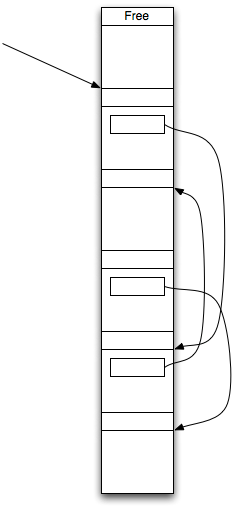
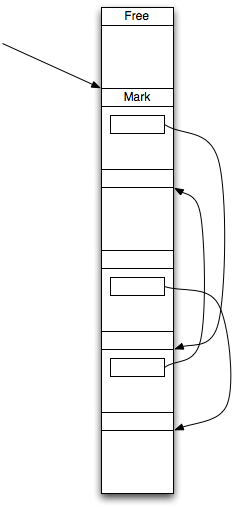
Essentially our garbage collector starts by sweeping all memory and clearing the mark bit.
We start by marking all the objects (using markGlobalState) that are pointed to by objects on the stack, or by objects in global memory:
Now we start in the loop to run through the blocks. Our ptr routine searches for the next marked block of memory, and then marks all the blocks that object points to:
We continue to mark foward, moving the pointer backwards only if we encounter a pointer to an earlier block in memory that is currently unmarked. This rewinding of the pointer is necessary to handle backwards pointing references without having to rewalk all of the blocks from the start of the heap:
(Because this pointer refers to something before the previous pointer, we move our pointer backwards:)
Once we’re done–and this is guaranteed to complete because there is only a finite number of objects, and we only rewind the pointer when something is unmarked–we then sweep through all of memory, marking as free objects we were unable to reach. We know these objects are freed because we could not reach them:
Reference Counting
Garbage collection is very difficult to do correctly. You need to have a method, no matter in what state you’re in, to know where the pointers are, and what they point to. And you have to have a way to look inside of every object and know what chunks of memory in the heap are pointers, in order to correctly mark things.
In other words, you need to provide markGlobalState, numPointersInAllocBlock, and pointerInAllocBlock or the equivalent.
An easier way to track the pointers pointing to an object is by tracking a reference count associated with each object. This requires some work on the part of the developer; in fact, it requires that you explicitly call routines similar to alloc and free to keep track of the reference count to a collection of objects. On the other hand, it doesn’t require a lot of work to get working correctly. And this technique has been adopted by Microsoft’s COM system and Apple’s Objective-C on the Macintosh or iOS operating systems.
(Yes, I know the latest versions of Objective C on the Macintosh provide garbage collection. However, you can still do reference counting, and you must do reference counting on iOS.)
Reference counting is extremely easy to do. Essentially it involves having the objects you want managed via reference counting internally store a reference count. Newly allocated objects set the reference count to 1, and if the reference count reaches zero, the object frees itself.
In C++ we can easily declare a base object for reference counting:
class BaseObject
{
	public:
					BaseObject();

		void			Retain();
		void			Release();

	protected:
		virtual		~BaseObject();

	private:
		uint32_t		fRefCount;
};
Our base class stores a reference count, called fRefCount. When we allocate our object, we first set the reference count to 1:
BaseObject::BaseObject()
{
	fRefCount = 1;
}
We then need to mark something as retained: meaning there is a new pointer pointing to the same object. The retain method can be written:
void BaseObject::Retain()
{
	++fRefCount;
}
Releasing the object then decrements the count, and if the count reaches zero, frees the object:
void BaseObject::Release()
{
	if (0 == --fRefCount) {
		delete this;
	}
}
In Objective C (but not on Microsoft COM) we have an additional method, called “autorelease”, which adds the object to an NSAutoreleasePool, which automatically calls release when the pool is drained, either explicitly or implicitly at the end of each event loop. In C++ we can do something similar by extending our base class by adding an array of object pointers:
class BaseObject
{
	public:
					BaseObject();

		void			Retain();
		void			Release();
		void			AutoRelease();

		static void	Drain();

	protected:
		virtual		~BaseObject();

	private:
		uint32_t		fRefCount;
		static std::vector gPool;
};
We then add an AutoRelease and a Drain methods:
void BaseObject::AutoRelease()
{
	gPool.push_back(this);
}

void BaseObject::Drain()
{
	/* Run through our array of objects */
	int i,len = gPool.size();
	for (i = 0; i Release();
	}
	/* Now erase the array */
	gPool.clear();
}
Notice that simple assignment of pointers doesn’t actually call Retain or Release anymore than it automatically called alloc() and free() described earlier. Instead, we must use a coding convention to know when we should Retain, when we should Release, and (if present) when we should AutoRelease.
The Microsoft COM rules are quite simple: if a function call returns a pointer, you must release that pointer in your routine when you are no longer using it. So, for example, suppose we have a routine GetThing() which returns a BaseObject:
BaseObject *GetThing()
{
	return new BaseObject();
}
Then a caller must in turn release the value:
void UseBaseThing()
{
	BaseObject *obj = GetThing();

	/* Do some stuff to this */

	obj->Release();
}
Now if the routine GetThing is returning a reference to an object that it is storing in memory, then when the object is returned, the routine’s return value “owns” the reference to that global object, but the ownership must continue to be held locally. So you would use Retain:
BaseObject *gPtr;

BaseObject *GetThing()
{
	gPtr->Retain();
	return gPtr;
}
And similarly, if the caller function wants to hold onto the pointer (say, by storing it in a global variable), rather than call retain we simply keep ownership of the pointer:
BaseObject *gPtr2;

void UseBaseThing()
{
	BaseObject *obj = GetThing();
	/* Store object; don't release it--we still own the reference. */
	gPtr2 = obj;
}
The rule is quite simple: if a pointer is returned, the pointer must be released. But it adds complexity: it means you must constantly be calling the ‘Release’ method all the time, and that can become quite cumbersome.
On the other hand, and the key point to all of this, is that the retain and release rules are simple–and they are local: you don’t need to know how any other module in the system works, you only need to know what to do locally.
Apple gets around the problem of constantly having to release objects (and retain objects that are held locally) by introducing the -autorelease method.
On the Macintosh (and iOS), the rules are given on Apple’s web site. The two rules are:
(1) You gain ownership of an object only if you create it (using -alloc or any method that starts with ‘new’, or contains ‘copy’), or if you explicitly retain the object.
(2) You release or autorelease the object when you no longer need to hold ownership of the object.
Using these two rules, we wind up writing less code–but things can get a little more complicated. In our example above, our ‘GetThing’ routine, because it does not start with ‘new’, would simply return the object:
BaseObject *gPtr;
+ (BaseObject *)getThing
{
	return gPtr;
}
If we were allocating this object (as in our first example), we would, because of the naming convention either rename our method to ‘newThing’:
+ (BaseObject *)newThing
{
	return [[BaseObject alloc] init];
}
Or we would need to make sure that ownership is not passed up by marking the object as autorelease:
+ (BaseObject *)getThing
{
	return [[[BaseObject alloc] init] autorelease];
}
In fact, this pattern is so common you’ll find yourself typing “alloc] init] autorelease]” nearly on autopilot.
The call “UseBaseThing” is similarly changed, depending on how we’re using it. If we don’t hold onto a reference to the object, we would not need to call ‘release’ because we aren’t hanging onto the object:
+ (void)useBaseThing
{
	BaseObject *obj = [BaseObject getThing];

	/* Do some stuff to this */
	/* Notice we don't release this object */
}
And if we are hanging onto the object, we must retain the object:
+ (void)useBaseThing
{
	BaseObject *obj = [BaseObject getThing];
	gPtr2 = [obj retain];
}
Likewise, if we are calling newThing, we’d be getting ownership back from the call–so we would need to release it as appropriate. So, our examples would be:
+ (void)useBaseThing
{
	BaseObject *obj = [BaseObject newThing];

	/* Do some stuff to this */

	[obj release];
}
And, if holding the object, we already have ownership, so we don’t need to release it:
+ (void)useBaseThing
{
	BaseObject *obj = [BaseObject getThing];
	gPtr2 = obj;
}
Notice in all of the above, simply assigning or copying pointers around in a pointer doesn’t actually do anything on its own. A pointer is simply like an integer, but with the integer referring to an address in memory. In all of this evolution from fixed locations in RAM to garbage collection and object reference counting, we have never changed the immutable fact that simply copying or adding values to an address doesn’t affect how heap memory is handled. Garbage collection takes place after an object is no longer pointed to–and sometimes objects that are no longer referenced by a pointer can live for a very long time.
There are other subtleties that can take place here: different versions of memory management tools may do different things when a chunk of memory is allocated or freed. Some test tools may even store the location in a program where an object is allocated, so if there is an unbalanced alloc/free cycle, the line of code in error can be discovered easily. And there are many flavors of garbage collection out there which each behave differently, though ultimately result in the same end.
Further, with reference counting, cycles of objects can easily be created which cause the objects to linger long after those objects are no longer actually in use. It’s why it is important to think about cycles of pointers, especially when developing UIView objects which may hold references to other UIViews to perform certain operations.
In fact, a very common bug is to create one UIView that refers to another:
@class BView;
@interface AView : UIView
{
	BView *view;
}

@property (retain) BView *view;
@end

@interface BView : UIView
{
	AView *view;
}

@property (retain) AView *view;
@end
The problem here is that if AView and BView are part of the same view hierarchy, and are assigned to each other, then when the view hierarchy is released, AView and BView retain each other–preventing the memory from being reclaimed even though it is no longer being used.
In cases like this, when a third object holds two others which refer to each other–in this case, implicitly, by the UIWindow holding all of the views in the view hierarchy–it is better if only an unretained reference is held to these objects instead:
@class BView;
@interface AView : UIView
{
	BView *view;
}

@property (assign) BView *view;
@end

@interface BView : UIView
{
	AView *view;
}

@property (assign) AView *view;
@end
Assignment is not ownership, and when the window is released, AView and BView will both be released successfully.
Hopefully this brief overview of memory management, from setting fixed locations in RAM to heaps to garbage collection and reference counting, will give you a good idea of how memory management actually works–and what the pitfalls are.
The key takeaways should be:
(1) Assigning pointers is not ownership. Simply writing Pointer *a = b; doesn’t actually grant ownership to ‘a’ when it points to ‘b’. You must, unless in a garbage collection environment, explicitly ask for and release ownership.
(2) If not using reference counting, the assumption is that only one pointer actually “owns” an object. For object-oriented programming this is too strict a restriction, and thus we must either introduce garbage collection or establish reference counting and conventions on how references are counted.
(3) For reference counting systems, there are (to my knowledge) two conventions for reference counting: the Microsoft COM convention, and the Apple Objective-C convention. You must also be aware of cyclical ownership references: if you accidentally grant ownership that turns into a cycle or ring of ownership, objects may leak because they mutually refer to each other, without actually being used anywhere else.












 Development Chaos Theory