Unknown's avatar

About William Woody

I'm a software developer who has been writing code for over 30 years in everything from mobile to embedded to client/server. Now I tinker with stuff and occasionally help out someone with their startup.

Objective C subscripting operators

I keep forgetting where this link is, so I’m putting it here: CLang Reference: Objective C, Object Subscripting.

This documents the methods we need to define if we are declaring our own Objective C class and we want to implement array-style subscripting or dictionary-style subscripting.

Extracting from the text:

… Moreover, because the method names are selected by the type of the subscript, an object can be subscripted using both array and dictionary styles.

Meaning if the compiler detects the subscript is an integral type, it uses the array-style subscript method calls, and when the subscript is an Objective C pointer type, it uses a dictionary-style subscript method call.

For array subscripting, use either or both of the methods

- (id<NSObject>)objectAtIndexedSubscript:(NSInteger)index;
- (void)setObject:(id<NSObject>)value atIndexedSubscript:(NSInteger)index;

For dictionary-style subscripting, use either or both of the methods

- (id<NSObject>)objectForKeyedSubscript:(id<NSObject>)key;
- (void)setObject:(id<NSObject>)value forKeyedSubscript:(id<NSObject>)key;

This goes hand-in-hand with my earlier post Objective C declaration shortcuts, and has been a public service announcement.

Unknown Knowns.

While Donald Rumsfeld was blasted for discussing “known knowns” and the like, it is a core principle that you see in things like the CISSP security training materials and in other areas where security is a factor. It also factors into things like scientific research, where we constantly push the boundaries of what we know.

And the idea goes something like this:

There are known knowns, that is, things we know that we know. For example, I know the lock on the back door of the building is locked.

There are known unknowns, that is, things we know that we don’t know. For example, I don’t know if the lock on the back door of the building is locked–and knowing I don’t know that, I can go down and check.

And there are unknown unknowns, that is, things we don’t know that we don’t know. For example, I’ve never been in this building before, and I have no idea that there is even a back door to this building that needs to be locked.

Unknown unknowns can often be uncovered through a systematic review and through imagining hypothetical scenarios. We could, for example, on moving into this building, walk the perimeter of the building looking for and noting all the doors that go in and out of the building: we use the fact that we don’t know the building (a known unknown) to uncover facts about the building which then help us make informed decisions in the future–converting the unknown unknown about back doors into a known quantity.

Though that doesn’t help us if there is a tunnel underneath.


If we put these into a graph it may look something like this:

 
Known knowledge
Unknown knowledge
What we know:
Known knowns

Things we know we know. (Example: we know the back door is locked.)

Unknown knowns

???

What we don’t know:
Known unknowns

Things we know we don’t know. (Example: we don’t know if the back door is locked.)

Unknown unknowns

Things we don’t know we don’t know. (Example: we don’t know there is a back door to lock.)

Now the forefront of scientific knowledge lives in the lower right quadrant: we’re constantly pushing the frontier of knowledge–and part of that means figuring out what are the right questions to ask.

The forefront of security disasters also live in that lower right quadrant: this is why, for example, safety regulations for airplanes are often written only after a few hundred people die in a terrible airplane accident. Because until the accident took place we didn’t even know there was an issue in the first place.

But what is the upper right quadrant? What is a “unknown known?”


The side axis: what we know and what we don’t know–this is pretty straight forward. I either know if the back door is locked or I don’t.

The top axis: I would propose that this is really a discussion about our self-awareness or self-knowledge: do we even know the right question to ask? Do we even have a full enough mental model to know what we should know?

Do we even know there is a back door on the building?

Have you ever gone to a lecture and, at the end of a long and involved technical discussion, the presenter turns to the audience and asks if there are any questions–and there is nothing but silence? And afterwards you realize the reason why you’re not asking questions is not because the information presented was so obvious that you just managed to absorb it all–but instead found that you didn’t even know the right question to ask? That’s “unknown knowledge”–you don’t really know what you just learned, and of course are unable to formulate a question, because to do so would require that you knew what you knew and what you didn’t know, and that you knew what you didn’t understand.

It takes time to learn.


So I would propose that an unknown known is something we know–but we are unaware of the fact that we know it. Our self-knowledge does not permit us from knowing that we know something–or rather, from knowing that we have learned something or are aware of something that perhaps others may not be aware of.

Meaning “unknown knowns” are any bit of knowledge that, when someone asks about it, we respond with “Well, of course everyone knows that!”–which is a genuine falsehood, since clearly the person asking didn’t know.

Unknown knowns are things we are unaware that we have to communicate. Unknown knowns are things we don’t know require documentation or, when we are made aware of them we think is either stupid or obvious.

Unknown knowns include things like:

Undocumented software which has no comments or documentation in them, because “of course everyone should be able to read the code.”

Undocumented corporate procedures, which is just “part of the corporate culture” that “everyone” should just understand.

Anything we think just “should be obvious.”

Nothing is obvious.

Yes, we need signs in a bathroom reminding workers at a restaurant to wash their hands–because some people may not know the effects of hygiene on food preparation and it is better to constantly remind people than to suffer the consequences. Yes, we need corporate policy manuals, ideally abstracted for ease of reading, which reminds people that sexual harassment is not welcome–and defines what sexual harassment actually is. Yes, developers need to document their code: code is not “self-documenting.”

And that arrogant feeling that rises up in most people when they respond “well, of course everyone knows that!” is a natural response to the embarassment on discovering an “unknown known”–on discovering that you were so unaware of yourself that you couldn’t catalog a piece of vital knowledge and share it properly with someone who needed it.

And by placing the blame on someone else with your “well, of course!” statement you deflect blame from your own lack of self-awareness.

Worse: because we don’t know what we know, and because for many of us the natural reaction is to place blame on the person who genuinely didn’t know, we create barriers when training new hires or when teaching new developers or when bringing on new players onto the team.

Because by telling new people “it’s your fault that I didn’t tell you what I didn’t know I should tell you” we diminish others for what is, essentially, our own lack of self-awareness.

Lambda Closures (revisited)

I was looking at an old post of mine about how I implemented closures using closure generation, and it seems… overly complex.

So I went about doing a simpler implementation.


For review, we implement a LISP interpreter with a special instruction which essentially takes the following arguments:

($$closure function arg1 arg2 ...)

This special function takes the lambda declaration, pushes the arguments provided as constants, and generates a new function which in essence pushes the constants and calls a special CLOSURE instruction in the VM.

    PUSHC function
    PUSHC arg1
    PUSHC arg2
    ...
    CLOSURE n

The closure instruction modifies the stack by putting the arguments at the top of the stack (through rotating the stack), then jumps to the function.

The purpose of this instruction is to allow us to add the closure of a lambda to the argument list of the lambda function; thus, if we have the following declaration:

(let ((a 0))
     (lambda (b) (+ a b)))

We rewrite this using our special $$closure function (using the notation that ‘epsilon’ is ‘lambda’ without closures) as:

(let ((a 0))
     ($$closure (epsilon (a b) (+ a b))
                a)))

Our $$closure instruction then generates a new procedure which takes one argument ‘b’, adds ‘a’ to the stack, then calls our original epsilon (think “lambda without closures”) function.


We can handle variables from an outer scope by wrapping it; we declare the following methods:

(define ($$wrap v) (cons v nil))
(define ($$fetch v) (car v))
(define ($$store v val) (rplaca v val) val)

This has the net effect of using an indirect reference to refer to a particular element, and has the nice property that it can be passed as a “constant” to our closure function.

Thus, if we have the following:

(let ((a 0))
     (lambda (b) (set! a (+ a b))))

Our rewrite function should generate the following:

(let ((a ($$wrap 0)))
     ($$closure (epsilon (a b) ($$store a (+ ($$fetch a) b))) a))

In other words, we wrap a as a list of one item, and this gives us the ability to access the contents of a even as our let statement passes out of scope.

This means we can do the following:

(define (makeproc) 
        (let ((a 0))
             (lambda (b) (set! a (+ a b)))))

(set! Function1 (makeproc))
(set! Function2 (makeproc))

(Function1 3)
> 3
(Function2 5)
> 5
(Function1 4)
> 7
(Function2 -4)
> 1

Each invocation of makeproc creates a new list item (0) which is then stored in our new lambda function. This means Function1 and Function2 point to two separate (0) objects, which are then independently updated as we call either function.


Now my previous implementation seemed overly complex, so I re-implemented the algorithm.

The essence of the state that we track as we parse through the LISP code to detect closures is driven by the following observations:

First, we only need to make the following modifications to our statement as we perform closure analysis:

(1) Wrap all ‘lambda’ declarations with a $$closure statement with the closure inside the lambda. We don’t rewrite ‘lambda’ declarations that do not read or write variables outside of the scope of the lambda function.

(Note: while in our discussion above we use the keyword ‘epsilon’ to distinguish from ‘lambda’, in our implementation we use ‘lambda’ exclusively.)

(2) For those variables from an outer scope that is written to by an inner scope, we need to replace all ‘set!’ invocations with ‘$$store’, all instances of the variable with ‘$$fetch’, and instances where we create the variable with ‘$$wrap’.

Second, as we rewrite statements, the contents of a statement does not affect the outer part of the statement. Meaning as we recurse down we can rewrite statements inline; there is no context inside a statement (aside from if it is accessed) that we need to maintain.

Third, each variable is declared only in one place. Yes, a variable can be masked by an inner declaration, but that refers to a distinct variable.

My second point and third point means I can rewrite statements as I recurse and perform analysis.


Now the goal of my analysis and rewrite is the following:

(1) Determine which variables from an outer scope is written to or read from. Variables declared in my own scope are ignored, and we only need to understand the usage state of the first instance of a variable declared outside of my scope.

(2) We only need to determine if a variable is read from or written to; we do not need to track any other state.

So the state which I track as I recurse through the statements in my system is:

( local-scope usage )

where local-scope is a set of variables that have been declared in my local scope, and usage is a push-down stack of variables and their usage, as a pair of values–the first the variable name, the second a number 0 (declared but unused), 1 (read from) or 2 (written to).

For example, if we encounter the following declaration:

(let (a b c) ...)

Our state is:

((a b c) ((a 0) (b 0) (c 0)))

if, in an inner scope we encounter:

(let (c d e) ...)

our state is updated to

((d e a b c) ((c 0) (d 0) (e 0) (a 0) (b 0) (c 0)))

This means that inside if we encounter a lambda function, when it updates the usage, it only updates the usage of the variable in the usage list which is in our inner-most scope.

Meaning if we encounter the following inside our inner let:

(lambda (a) (set! c a))

First, note that we’re inside a lambda–a change of scope. So our state as we parse the contents of the lambda dumps the variables in local-scope list and replaces it with (a):

((a) ((a 0) (c 0) (d 0) (e 0) (a 0) (b 0) (c 0)))

(Note that we push (a 0) on our usage stack because inside our lambda, the variable a has local scope.)

Next we examine the statements. We see a set!, and we examine c: since it is not in our local-scope we modify our state to show that our variable c is written. We only change the first item in the stack, since the variable c we’re interested in is in the inner scope:

((a) ((a 0) (c 2) (d 0) (e 0) (a 0) (b 0) (c 0)))

We also examine ‘a’, which is read from–but because it is inside the local-scope, we do not mark the usage of ‘a’.

Now our method we use to do this scanning ($$ScanUsage) returns a list of the variables in this inner scope which were found and modified; in our case, this is the list (c).

On return, our inner let now sees the following:

((d e a b c) ((c 2) (d 0) (e 0) (a 0) (b 0) (c 0)))

We also get back the return value (c), indicating that the variable c was modified in the inner scope of the lambda function.

The lambda function then can be modified for closure to pass in the variable found inside of it: our lambda above is rewritten in-place as:

($$closure (lambda (c a) (set! c a)) c)

Now on return we have our return value (c), which we now examine against usage to see if the usage of the variable needs to be rewritten. Since in our usage list, the usage value is 2 (written to), we call another method $$RewriteWrite which recurses down and rewrites our closure to its final form:

($$closure (lambda (c a) ($$store c a)) c)

This also rewrites our inner let as:

(let ((c ($$wrap nil)) d e) ...)

That is, ‘c’ is rewritten as a list, initially initialized to (nil).


Our $$RewriteWrite method, of course, must examine each statement and if it is a declaration which masks the variable we are rewriting, we stop recursion at that point; the inner scope is another variable, albeit with the same name.

And discovering that scope in terms of our $$closure statement must take into account that the only variables in our lambda which are in the inner scope are those not in the parameter list of our $$closure statement.


Also note that our algorithm heavily leans on ‘rplaca’ and ‘rplacd’ to rewrite our statement rather than generating a new statement. This has implications about statements that may be generated and then later evaluated, where large parts of the code is contained in quote statements.


I believe this is an easier implementation in that the data structure being passed around is local to just the statement being examined, and is far simpler to understand than the older implementation. The code I have appears to correctly rewrite closure statements, though at this stage I haven’t finished testing yet.

Geek Moment: LISP IDE.

Excuse me while I have a geeky moment.

So in the background for a couple of hours here and there I’ve been tinkering with a LISP interpreter, with the goal of eventually inserting the LISP engine into an iOS application in order to make a programmable calculator with some ability to do basic calculus, as well as standard scientific calculator stuff, and automatic unit conversion stuff. (I even have some code somewhere which can handle arbitrary unit conversions, including arbitrary conversions in and out of standard scientific units.)

(Well, properly it’s a LISP compiler which compiles to a VM instruction set.)

A little while ago I managed to write a LISP compiler in LISP, compiled by a bootstrap compiler written in C, which was capable of compiling itself.

Well, now I have a primitive IDE for writing LISP code, which supports syntax coloring, automatic indentation, as well as setting breakpoints in my LISP code (step over and step out turns out to be a bitch) and examining the variable stack.

Breakpoints are managed by maintaining a table (including PC references into the instruction set) and setting a special instruction which halts the VM, and “single step” is handled by executing one VM instruction at a time until I hit one of the PC breakpoints.

And when not single stepping instructions, the VM is run on a second thread, to allow me to stop execution arbitrarily (in case of infinite loops).


Some pictures: showing breakpoints

Lisp2

Showing the debugger in progress, examining the stack and variables.

Lisp1


Of course there are some usability issues; I certainly wouldn’t want to ship this as a product. (In particular, you need to specify the entry point of a routine to debug, and breakpoints require the code to be compiled first–and compilation is a manual process; you have to press the compile button before adding breakpoints or starting to debug.)

And there are some gaps–the LISP implementation is incomplete, closures haven’t been written into the compiler (yet), and I don’t have a means to write to the standard out via a LISP instruction.

But there is enough to start actively building these components and testing them within the IDE, and fleshing out my LISP implementation–particularly since my LISP compiler is built in LISP, so adding features can be done with my IDE.


Next steps: include a window in my IDE which emulates the planned UI for the iOS product (a calculator keyboard, menu and display system–with keyboard events executing predefined LISP instructions, the menu built from a LISP global variable and the display formatting display instructions from another LISP global variable), as well as fixing bugs, fleshing out the LISP interpreter, and creating a mechanism for printing from LISP into my output window.

After that I can start writing the calculator code in LISP.


The syntax coloring was hung off the NSTextView (by setting a 1 second timer on update text events, and running a simplified LISP parser to do syntax coloring and variable detection to color local variables), and autoindent was handled by listening for newline events and calculating the proper indentation for the current parenthesis level.

And the nice part is that similar hooks exist on iOS in UITextView, and the debugger wrapper class should all port fairly easily to iOS. Meaning the functionality of the IDE should port rather easily to iOS.

Things to remember: Time Zones.

*sigh*

Okay, here are some things to remember about time zones, jotted out in no particular order.

  • On most modern operating systems, “time” is an absolute quantity, usually measured as the number of seconds from some fixed time in the past, for example, since midnight on January 1, 1970 GMT. This fixed time is called the “epoch.”

This time is an absolute quantity regardless of where you are in the world or how you represent time at your location.

  • Time Zones represent a way by which we represent an absolute time in a human readable format, appropriate for the location where the person is on the Earth.

So, for example, 1,431,385,083 is the number of seconds since our epoch, may be displayed as “May 11, 2015 @ 22:58:03 UTC”, or as “May 11, 2015 @ 6:58:03 PM EST”, or as “May 11, 2015 @ 3:58:03 PM PST”.

While it is easy to think of Time Zones as an offset from GMT, I find that it’s better to treat Time Zones as a sort of “black box”, since the rules as to which time zone offset that applies at a given date can be quite complex. (And if you are in one of the counties in part of Indiana which cannot make up its mind which time zone it wants to be in–EST or CST–the actual rules can be quite arbitrary and bizarre.)

So in a sense a time zone is a thing which converts an absolute number of seconds since epoch, and presents a time suitable for display to the user.

  • When dealing with web applications or mobile applications, the time zone to use when displaying a time depends on the application.

Most of the time, the appropriate timezone to use when displaying a time is the device’s native time zone. Meaning most of the time the default on most platforms is to use whatever time zone the device is in–which is the default when creating classes which display or parse the time.

Sometimes, however, it may be appropriate to display the time in a different time zone. For example, an application that may display the time of an event at a park or for a conference or at a particular movie theater should use the time zone associated with the location of the park or conference or movie theater.

And sometimes I would argue it would be appropriate to display the time twice in two separate time zones. For example, a chat application which notes the sender and receiver of a message are in two different time zones may wish to display the time in the receiver’s time zone and a second time in the sender’s time zone.

Rarely you may need to do something else. For example, an application which tracks an event that happens at the same time of day across multiple dates regardless of the actual time zone. If that is the case, then you may wish to do something other than store the time as an absolute number of seconds and translate to the appropriate time zone.

  • If you ever need to ask for the timezone a user is in–for example, you need to set the preferred time zone for a movie theater–remember: in the United States there are only 10 time zones.

If you look through the IANA Time Zone Database, you may see dozens and dozens of time zones for the United States. But the reality is, there are only 10 time zones that you need to worry about: the nine mentioned in this article, and Arizona, which does not observe daylights savings time.

If the user lives in the areas of Arizona which do observe DST, they can manually select “Mountain Time”; users in Indiana can sort out their own state’s issues.

(Many of the entries in the IANA database deal with historic timezone issues as individual areas of the country tried to sort out which time zone they wanted to be in.)

Similarly Canada has only 6 time zones, and other nations really only observe a handful of time zones.

  • In general, time zones mentioned in the IANA Time Zone database are named after the most populous city in that time zone. Which means if you want to present a more user friendly label you’ll need to roll something which translates between the time zone name and the IANA time zone title.

For example, PST/PDT is actually labeled “America/Los_Angeles”; Los Angeles is the most populous city in the area which observes Pacific Time.

Things to remember: IB_DESIGNABLE

Some random notes about creating designable custom views in Xcode:

  1. Adding the symbol IB_DESIGNABLE to the view declaration just before the @interface declaration of your view in the view header will mark your view as designable in Interface Builder; the view will be rendered in your view.
  2. Each property that is declared with the IBInspectable keyword will then be inspectable and can be set in Interface Builder.
  3. The properties that can be inspected this way are: “boolean, integer or floating point number, string, localized string, rectangle, point, size, color, range, and nil.”
  4. The preprocessor macro TARGET_INTERFACE_BUILDER is defined to be true if compiled to run on Interface Builder. Use this to short circuit logic which shouldn’t run on IB.
  5. Likewise, the method – (void)prepareForInterfaceBuilder; is called (if present) on initializing the class only if it is loaded in Interface Builder.
  6. You can debug your views within Interface Builder; Apple documents the process here.

Things to remember: Apple Store and TestFlight Edition.

  1. The ID you sign in on developer.apple.com/ios and the ID you sign in using itunesconnect.apple.com must be the same ID. If they are different, you cannot submit through Xcode.
  2. You cannot get around this by doing an ad-hoc export of your .IPA file and using Apple’s Application Loader to get around this. For some reason your .IPA will not be signed with the correct endorsements to enable TestFlight.
  3. Until you get all the stars to correctly align:
    • Use the same Apple ID for your developer.apple.com and itunesconnect.apple.com accounts,
    • Set up a new application in itunesconnect.apple.com for your application you wish to test,
    • Correctly build your .IPA with a distribution certificate and a provisioning profile which is set up correctly,
    • Correctly submit your .IPA through Xcode (rather than exporting the .IPA and submitting with Apple’s Application loader),
    • Correctly update your build numbers as you submit incremental builds,

    then the Apple TestFlight UI makes absolutely no fucking sense.

    There is no hint how to get through the happy path, or why things go wrong. You just see weird errors that make no sense, and instead of seeing a line in your pre-release software list saying why something cannot be tested, you instead just see a blank line and errors which make little sense and give zero hint as to what you did wrong.

Apple sure can suck the wind out of the fun of writing iOS software.

Update: Even if you do manage to finally work the ‘happy path’ correctly, (a) Apple still does a review on the application before they allow it to go out to “external testing” (really?!? isn’t the point of ad-hoc distribution for your own people to test features for incomplete applications???), and (b) it’s not entirely clear why some of your members do not have the ability to become “internal testers.”

Combine this with the fact that each Apple device generally is held by a single owner with a single Apple ID, and that makes even accepting invites (assuming invites are sent out) for a consultant who may have multiple Apple IDs a bit problematic. Especially if I want to test for a client on my own private iPhone or iPad.

Why design patterns from web development makes crappy iOS or Android apps.

Increasingly I’ve been encountering software developed for iOS which was written by someone who cut their eye-teeth on writing UI software for the web in Javascript. And I’ve noticed a common pattern which arises from that code which makes their code overly complex and hard to maintain on iOS.

Basically, they treat UIView-based objects as passive objects.

And if you started live writing software on the web using Javascript, this makes sense. After all, the view structure represented in the DOM hierarchy is by and large a passive participant in the user interface. When you want to present a list of items in a scrolling region, for example, you would create the scrolling region, then populate the items in that region, setting the attributes of each of the <div> sections and <li> sections with the appropriate CSS styles for overflow and font information.

(In something like GWT it’s not hard to create your own custom view objects, just as you can create custom view objects in Javascript. But at the bottom of the stack, the Menu class or the Table class you built simply declares a <div> and manipulates the subset of the DOM within that <div> tag. The view hierarchy is still a passive participant; you simply wrap part of that passive content into something with some logic.)


The problem is when you move all this onto iOS or onto Android or onto Windows or onto MacOS X, you lose one of the most powerful elements of those platforms–and that is Views are active objects rather than passive participants.

Meaning that a child class of a UITableViewCell in iOS can actively know how to present a data record passed to it; you do not need to put the code to populate the table view cell within the UITableViewController class. You can build an Image View which knows how make a network call and load and cache an image without putting image loading and caching code into the UIViewController. You can create a single view which has complex behavior–without having to put the behavior code inside the view controller.

And this allows you to create very complex user interface elements and reuse them throughout your code.

Of course this also needs to be balanced with the available tools. For example, it makes no sense to create a custom UIButton which presents a button with a different font, when you can set the font and appearance of a default button within the NIB.

But it does indicate that in many cases the proper thing to do is to push functionality down into the view, rather than make the view controller responsible for that logic.


You can’t do this in Javascript. You cannot create a new <myTableTag> which takes special arguments and presents the contents in a unique way, which can be reused throughout your site.

And there is nothing inherently “wrong” with putting all the logic for your button’s behavior, the way table view cells are laid out, and the responsibility for loading images in the background into your view controller.

It just makes life far more complex than it has to be, because you’re leaving one of the most important tools in your arsenal on the floor.

Design affordances

An “affordance” is an element of a design which suggests to the user how to use or operate an object. For example, the handle of a teapot suggests how to grab the teapot to lift it; a doorknob suggests a means to opening a closed door.

Affordances are inherently cultural: an amazonian tribesman who has never visited the modern world may need help discovering how to open a closed door. But affordances that work well are common: once he learns how to open one door he should be able to open all doors–even those with slightly different affordances. (A lever rather than a knob, for example, so long as it is located where the knob would be located.)

Because they are cultural, like all cultural things we take them for granted: we don’t recognize that, for example, there are multiple different ways to latch a closed door and an accident of history could have us reaching down for the floor latch to unlatch a door, rather than rotating a knob or lever.

Design failures are those where affordances are not clearly discoverable or which follow the design language we’ve learned. For example, if one were to design a door with a latch at the floor, and no knob or push plate, how long would it take you to discover the thing closing the door was a latch at the floor rather than a knob at waist height? Probably a few moments and you’d probably be very frustrated.


Now unlike the physical world, where there really are only so many interactions you can have to open a door or a window or lift a teapot from a hot surface, the software world is completely abstract. There are no limits, really, on what you display or how you interact with that display. In custom installations (such as in your car or at a kiosk), you can literally use any hardware interaction you like: the BMW iDrive system, for example, uses a rotary knob that can be pushed around like a joystick and depressed, as well as two separate buttons. Modern touch screens make it possible to tap with multiple fingers and tap, press and hold, tap and drag, or any combination of those motions.

And because affordances are, in some sense, cultural (there is no reason why a door knob is at waist level except custom, for example), affordances become part of a “design language”–a means of representing things on a screen that say “I can be touched” or “I can be clicked” or “This is how you back up a level on the screens.”

A well designed set of affordances as part of a well designed visual language can do three things:

They can provide a way for users to quickly discover how to use your interface, thus reducing user frustration. (A common ‘back’ button to back up from a modal display in a car would make it easier on a driver who may be operating the car’s systems while driving down the road at 70 miles/hour.)

They simplify the design of a new application. A common visual design language makes it easier for designers and developers to follow a common design language by essentially following a short recipe book of design objects and design attributes.

They simply user interface development, by allowing software developers to design common control elements which embody these design elements. For example, if all action buttons look the same, a developer could write a single action button class (or use one provided by the UI framework), thus saving himself the task of building separate buttons for each screen of the application.

Likewise, a poorly executed design visual language creates problems for each of these items above: it can increase user frustration as none of the elements of an app (or multiple apps on the same system) work enough the same for the user to know what is happening. They complicate designers who feel free to design each page of an app separately, and who may not follow similar design patterns. They increase the workload on developers who cannot use common controls or common design elements in the application.

The most frustrating part to me is that at some level the computer software industry has come to consider these three failures features rather than bugs: a lack of a common design language allows elements of the application to be partitioned across different teams without having to worry about those teams needing to communicate. And at some level some users have come to believe some level of difficulty in using an application is a feature; a list of hurdles to overcome in order to become an “expert” on a product.

Though why one must become an “expert” to use a poorly designed radio function embedded in a car computer boggles my mind.


One of the most serious problems I have with Apple’s iOS design guidelines is twofold.

First, while Apple’s section on UI elements is rather complete in describing each of the built-in controls provided by iOS, it provides no unifying theory behind those controls which give any suggestion to designers seeking to design custom controls how to proceed.

For example, there is no unified theory as to how tap-able items should stand out that says to the user “I can be tapped on.”

As it turns out that’s because there is no unified theory: along the top and bottom of the screen controls are tappable based solely on their placement. For example, a tab bar at the bottom assumes all icons are tappable and represents switching to a different tab, at the top of a navigation bar the words on the left and right corners are tappable; the left generally takes you back a level and the right generally represents an action appropriate to the screen you are looking at. Tappable areas in an alert view are suggested by a gray hairline breaking the alert box into sections, and often (but not always) icons suggest tappability.

Second, the only suggestion Apple provided for custom controls is to “Consider choosing a key color to indicate interactivity and state,” and “Avoid using the same color in both interactive and noninteractive elements.”

In other words, the only design affordance Apple talks about is using color to indicate interactivity: a colored word may indicate a verb for an action, a colored icon may indicate a control that can be tapped on.

Which, in my opinion, directly conflicts with: “Be aware of color blindness.”

My own rule of thumb, by the way, is that if the affordances of your application cannot be discovered when your interface is rendered in black and white, then they cannot be discovered by people who are color blind.

Color, in other words, is a terrible affordance.


Google, apparently, is trying to resolve this by proposing a different user interface paradigm of “material.”

Many of the suggestions seem a little whacky (such as the idea that larger objects should animate more slowly as if they have greater mass), but the underlying theory of using shadows and hairlines to subtly indicate components of a user interface goes a long way towards solving the problem with affordances on a touch display.

(Which is why the idea that material can “heal itself” bothers me, because if an item is separate and can be moved, it should be represented as a separate object.)

Which is why I’ve taken the time to write this long blog post: because at least Google is trying to create a unified theory behind its user interface choices, and that suggests that Google may be heading in a completely different direction than Apple when it comes to user design.

In other words, Apple appears to be headed towards using the design elements of book design (typography, color, subtle use of shapes and typeface that may change from product to product) to suggest functionality, while Google is taking a more traditional HIG approach of creating an underlying unified theory as to what it is we’re manipulating, then building the basic building blocks off of this.

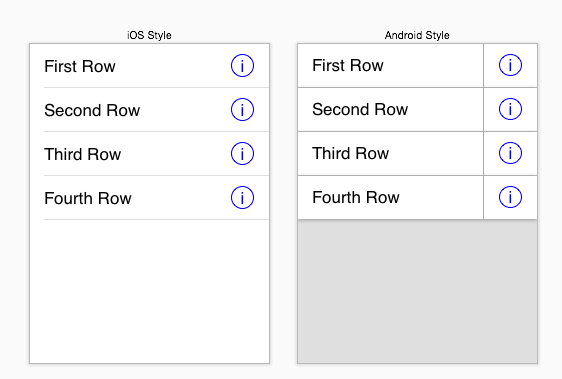
So, for example, a table cell in a table with a detail button may look like this on Apple’s iOS devices, but on Google the theory of “material” suggests we may separate the individual rows and separate out the right part of the each table to form a separate pane which is clickable:

Style

And while the design on the right, the Google “material” style looks considerably busier than the design on the left, functionality makes itself extremely apparent rather quickly.

It’s also, in a sense, far easier to design: icons do not need to be designed to differentiate a ‘verb’ action button from a status icon. Components can be separated out so that they are obviously clickable by simply bordering the control appropriately. Actions can be made apparent on the screen.

And while it is true that it gives rise to what appears to be a more “clunky” screen, the reality is on any mobile device–especially a phone form factor device, the user will be confronted with dozens (or even hundreds) of different screens, each one capturing one bit of information (a single item from a list of choices, for example), and configuring the equivalent of a single dialog box on a desktop machine may involve passing in and out of dozens of different screens on a mobile device.

Quickly being able to design those screens and make their functionality extremely apparent is extremely important, and if you don’t have the aesthetic design sense of a Jonathan Ives, having guide rails that results in some degree of clunkiness may be more desirable to the end user than a design which is completely unusable.

UITableViewCells

One of the biggest mistakes Apple made in the design of the iOS API was to expose the component views within a UITableViewCell.

Okay, so it really wasn’t Apple’s fault; they wanted to solve the problem of providing access to the components of a table view cell so we could use the off-the-shelf parts easily in our application. By exposing the textLabel, detailTextLabel and imageView UIView components, it makes it easy for us to modify the off-the-shelf parts to our own needs, providing a look which is consistent with the rest of the iOS universe.

But it was a mistake because it taught an entire generation of iOS developers some really bad habits.


One of the things that I greatly appreciate about object oriented programming is that it allows us to easily design applications as a collection distinct separate objects with well-defined purposes or tasks. This separation of concerns permits us to create modular classes, which have the following advantages:

  • Maintainable code. By isolating components into well-defined objects, a modification that needs to be made to one section of the code will, in a worse case scenario, require minor modifications in some other isolated areas of the code. (This, opposed to “spaghetti code” where one change ripples throughout the entire application.)
  • Faster development. Modules which are required by other areas of the application but which haven’t been developed yet can be “mocked up” in the short term to permit testing of other elements of the code.
  • Simplified testing. Individual modules can be easily tested and verified as correct within their limited area of concern. Changes that need to be made to fix a bug in an individual module or object can be made without major changes in the rest of the application.

There are others, but these are the ones I rely upon on a near daily basis as I write code.

Now why do I believe Apple screwed up?

Because it discourages the creation of complex table views (and, by extension, complex view components in other areas of the application) as isolated and well-defined objects which are responsible for their own presentation, and instead encourages “spaghetti code” in the view controller module.

Here’s a simple example. Suppose we want to present a table view full of stock quotes, consisting of the company name, company ticker symbol, current quote and sparkline–a small graph which shows the stock’s activity for the past 24 hours.

Suppose we code our custom table cell in the way that Apple did: by creating our custom view, custom table layout–and then exposing the individual elements to the table view controller.

Our stock data object looks like:

@interface GSStockData : NSObject

@property (readonly) NSString *ticker;
@property (readonly) NSString *company;
@property (readonly) double price;
@property (readonly) NSArray *history;
...
@end

This would give us a stock table view cell that looks like this:

#import 
#import "GSSparkView.h"

@interface GSStockTableViewCell : UITableViewCell

@property (strong) IBOutlet UILabel *tickerLabel;
@property (strong) IBOutlet UILabel *companyLabel;
@property (strong) IBOutlet UILabel *curQuoteLabel;
@property (strong) IBOutlet GSSparkView *sparkView;

@end

And our table view controller would look like this:

#import "GSStockTableViewController.h"
#import "GSStockData.h"
#import "GSStocks.h"
#import "GSStockTableViewCell.h"

@interface GSStockTableViewController ()

@end

@implementation GSStockTableViewController

#pragma mark - Table view data source

- (NSInteger)tableView:(UITableView *)tableView numberOfRowsInSection:(NSInteger)section
{
    return [[GSStocks shared] numberStocks];
}

- (UITableViewCell *)tableView:(UITableView *)tableView cellForRowAtIndexPath:(NSIndexPath *)indexPath
{
	GSStockTableViewCell *cell = (GSStockTableViewCell *)[tableView dequeueReusableCellWithIdentifier:@"StockCell" forIndexPath:indexPath];

	GSStockData *data = [[GSStocks shared] dataAtIndex:(int)indexPath.row];

	cell.tickerLabel.text = data.ticker;
	cell.companyLabel.text = data.company;
	cell.curQuoteLabel.text = [NSString stringWithFormat:@"%.2f",data.price];
	[cell.sparkView setValueList:data.history];

    return cell;
}

@end

Seems quite reasonable, and very similar to what Apple does. No problems.

Until we learn that the API has changed, and now in order to get the stock price history for our stock, we must call an asynchronous method which queries a remote server for that history. That is, instead of having a handy history of stocks in ‘history’, instead we have something like this:

#import 
#import "GSStockData.h"

@interface GSStocks : NSObject

+ (GSStocks *)shared;

- (int)numberStocks;
- (GSStockData *)dataAtIndex:(int)index;

- (void)stockHistory:(int)index withCallback:(void (^)(NSArray *history))callback;
@end

That is, in order to get the history we must obtain it asynchronously from our stock API.

What do we do?

Well, since the responsibility for populating the table data lies with our view controller, we must, on each table cell, figure out if we have history, pull the history if we don’t have it, then refresh the table cell once the data arrives.

So here’s one approach.

(1) Add an NSCache object to the table view controller, and initialize in viewDidLoad:

@interface GSStockTableViewController ()
@property (strong) NSCache *cache;
@end

@implementation GSStockTableViewController

- (void)viewDidLoad
{
	self.cache = [[NSCache alloc] init];
}

(2) Pull the history from the cache as we populate the table contents. If the data is not available, set up an asynchronous call to get that data.

- (UITableViewCell *)tableView:(UITableView *)tableView cellForRowAtIndexPath:(NSIndexPath *)indexPath
{
	GSStockTableViewCell *cell = (GSStockTableViewCell *)[tableView dequeueReusableCellWithIdentifier:@"StockCell" forIndexPath:indexPath];

	GSStockData *data = [[GSStocks shared] dataAtIndex:(int)indexPath.row];

	cell.tickerLabel.text = data.ticker;
	cell.companyLabel.text = data.company;
	cell.curQuoteLabel.text = [NSString stringWithFormat:@"%.2f",data.price];

	/*
	 *	Determine if we have the contents and if not, pull asynchronously
	 */

	NSArray *history = [self.cache objectForKey:@( indexPath.row )];
	[cell.sparkView setValueList:history];		// set history
	if (history == nil) {
		/* Get data for cache */
		[[GSStocks shared] stockHistory:data withCallback:^(NSArray *fetchedHistory) {
			/*
			 *	Now pull the cell; we cannot just grab the cell from above, since
			 *	it may have changed in the time we were loading
			 */

			GSStockTableViewCell *stc = (GSStockTableViewCell *)[tableView cellForRowAtIndexPath:indexPath];
			if (stc) {
				[stc.sparkView setValueList:fetchedHistory];
			}
			[self.cache setObject:fetchedHistory forKey:@( indexPath.row )];
		}];
	}

    return cell;
}

Notice the potential problems that can happen here. For example, if a user didn’t understand that a cell may be reused by the tableview, the wrong sparkline could be placed in the tableview if the user scrolls rapidly:

	NSArray *history = [self.cache objectForKey:@( indexPath.row )];
	[cell.sparkView setValueList:history];		// set history
	if (history == nil) {
		/* Get data for cache */
		[[GSStocks shared] stockHistory:data withCallback:^(NSArray *fetchedHistory) {
			/*
			 *	Now pull the cell; we cannot just grab the cell from above, since
			 *	it may have changed in the time we were loading
			 */

			// The following is wrong: the cell may have been reused, and this
			// will cause us to populate the wrong cell...
			[cell.sparkView setValueList:fetchedHistory];
			[self.cache setObject:fetchedHistory forKey:@( indexPath.row )];
		}];
	}

And that’s just one asynchronous API with a simple interface. How do we handle errors? What if there are multiple entry points? What if other bits of the code is using the table view?

Now if we had put all the responsibility for displaying the stock quote into the table view cell itself:

#import 
#import "GSStockData.h"

@interface GSStockTableViewCell : UITableViewCell

- (void)setStockData:(GSStockData *)data;

@end

Then none of the asynchronous calling to get values and properly refreshing the cells is the responsibility of the table view cell. All it has to do is:

#pragma mark - Table view data source

- (NSInteger)tableView:(UITableView *)tableView numberOfRowsInSection:(NSInteger)section
{
    return [[GSStocks shared] numberStocks];
}

- (UITableViewCell *)tableView:(UITableView *)tableView cellForRowAtIndexPath:(NSIndexPath *)indexPath
{
	GSStockTableViewCell *cell = (GSStockTableViewCell *)[tableView dequeueReusableCellWithIdentifier:@"StockCell" forIndexPath:indexPath];

	GSStockData *data = [[GSStocks shared] dataAtIndex:(int)indexPath.row];
	[cell setStockData:data];

    return cell;
}

@end

This is much cleaner. And for our table cell, because it has all the responsibility of figuring out how to populate the contents, if we have to rearrange the cell, it has zero impact on our table view controller.

Our table view cell becomes relatively straight forward as well:

#import "GSStockTableViewCell.h"
#import "GSSparkView.h"
#import "GSStocks.h"

@interface GSStockTableViewCell ()
@property (strong) GSStockData *currentData;

@property (strong) IBOutlet UILabel *tickerLabel;
@property (strong) IBOutlet UILabel *companyLabel;
@property (strong) IBOutlet UILabel *curQuoteLabel;
@property (strong) IBOutlet GSSparkView *sparkView;
@end

@implementation GSStockTableViewCell

- (void)setStockData:(GSStockData *)data
{
	self.tickerLabel.text = data.ticker;
	self.companyLabel.text = data.company;
	self.curQuoteLabel.text = [NSString stringWithFormat:@"%.2f",data.price];

	/*
	 *	If the history was in our object then we'd write the following:
	 */

	// [self.sparkView setValueList:data.history];

	/*
	 *	Instead we get it through a call to our data source
	 */

	self.currentData = data;	/* Trick to make sure we still want this data */
	[[GSStocks shared] stockHistory:data withCallback:^(NSArray *fetchedHistory) {
		/*
		 *	Verify that the history that was returned is the same as the
		 *	history we're waiting for. (If another call to this is made with
		 *	different data, self.currentData != data, as data was locally
		 *	cached in our block.
		 */

		if (self.currentData == data) {
			[self.sparkView setValueList:fetchedHistory];
		}
	}];
}

@end

And what about our caching?

Well, if we’re using proper separation of concerns, we’d create a new object which was responsible for caching the data from our API. And that has the side effect of being usable everywhere throughout the code.


My point is simple: unless you are using the canned UITableViewCell, make your table view cell responsible for displaying the contents of the record passed to it. Don’t just expose all of the internal structure of that table cell to your view controller; this also pushes responsibility for formatting to the view controller, and that can make the view controller a tangled mess.

Make each object responsible for one “thing”: the table view cell is responsible for displaying the data in the stock record, including fetching it from the back end. The view controller simply hands off the stock record to the table view cell. A separate class can be responsible for data caching. And so forth.

By making each object responsible for it’s “one thing”, it makes dealing with changes (such as an asynchronous fetch of history) extremely easy: instead of having to modify a view controller which slowly becomes extremely overloaded, we simply add a few lines of code to our table view cell–without actually expanding our class’s “responsibility” for displaying a single stock quote.


And in the end you’ll reduce spaghetti code.