Unknown's avatar

About William Woody

I'm a software developer who has been writing code for over 30 years in everything from mobile to embedded to client/server. Now I tinker with stuff and occasionally help out someone with their startup.

A fascinating analysis of the navigation bar, why it must go away, and why I disagree somewhat.

All Thumbs, Why Reach Navigation Should Replace the Navbar in iOS Design

As devices change, our visual language changes with them. It’s time to move away from the navbar in favor of navigation within thumb-reach. For the purposes of this article, we’ll call that Reach Navigation.

Read the rest of the article for a fascinating analysis as to why we should redesign navigation in iOS applications to support “reach navigation” by placing important elements towards the bottom left of the screen, and by supporting certain gestures, such as swipe to move back on the screen.


Of course I have two problems with the idea of completely obliterating the UINavigationBar.

Discoverability.

One of the trends we see in iOS and on mobile devices in general is the loss of discoverability: the loss of the affordances which allow a new user to, for example, recognize something can be tapped on, or something reveals a drop-down list of items. You can see this in iOS 10 on the new iPhone 7: pressure-taps on home screen icons for some applications pop up a list of options–but you have no way of knowing this. On earlier versions of Android if you wanted to delete an item in a table, you would do a “long-tap”: press and hold for some period of time. But is there anything in the table telling you this? Scrolling on both platforms give no hint that something can be scrolled if the list happens not to have an item that is “clipped” by a boundary–which is why Android started adding fade effects, and why some designers on iOS were adding the same thing.

Affordances allow us to determine that we can do a thing. And the UINavigationBar, even in it’s post iOS 7 stripped down state (where only color–a violation of the idea that some people are color-blind) indicates something can be tapped on, still communicates the screen we’re on can go back to a prior screen.

If we do away with the UINavigationBar, how will someone new to the platform know to swipe to cancel?

Further, if swipe to cancel becomes a standard gesture, how do we accommodate swiping left and right to browse a list of photographs? I know that Apple prefers swipe up and down for browsing and reserves swipe left and right for other gestures–but most designers working on the iOS platform don’t understand such subtitles, and Western speakers generally think in terms of scanning left and right.

Lower usage controls.

Sometimes we need to provide controls which permit us to do an operation, but which we don’t expect the user to commonly use. They still need to be discoverable.

Formerly when we considered design as an inverted L (with the most visually important thing upper left, and the top being the important branding and navigation area), we’d place the least used controls at the bottom.

But just because in today’s world the easiest to reach controls are at the bottom doesn’t mean we don’t have need for those lesser-used controls–nor should they be accessed by a hidden gesture. (I imagine for Pagans that a custom swipe of a pentagram on the screen reveals a secret settings page. And for the advanced, invoking pentagram swipes invoke different settings: swiping to invoke water, for example, brings up a different screen than invoking spirit.)

Instead, with the notion of reachability navigation, the ideal place to put lesser used settings would be the upper right–where you would need two hands to reach.

Further, while the designer in this article may hate branding–it still is useful from a business perspective.


So use the UINavigationBar. But rethink your navigation. And try to design your application so the most important elements are within thumb’s reach–at the bottom of the screen, where you would normally dump functionality you don’t want to deal with.

Transitioning To WordPress

So I’m most of the way to transitioning the entire web site to WordPress. Really the only thing I was using this site for was blogging, with the occasional page referring to some software project or another. So I’ve decided to just go ahead with the switch.

Of course it doesn’t help that my old hosting company were being a little annoying. I mean, who gives a business a 24 hour notice to rectify a problem on a Sunday? Really?

If you can’t explain it to someone not in your field, you don’t understand it.

Richard Feynman’s ‘Prepare a Freshman Lecture’ Test

Feynman was a truly great teacher. He prided himself on being able to devise ways to explain even the most profound ideas to beginning students. Once, I said to him, “Dick, explain to me, so that I can understand it, why spin one-half particles obey Fermi-Dirac statistics.” Sizing up his audience perfectly, Feynman said, “I’ll prepare a freshman lecture on it.” But he came back a few days later to say, “I couldn’t do it. I couldn’t reduce it to the freshman level. That means we don’t really understand it.”

John Gruber continues, regarding Brian Merchant’s The One Device:

Schiller didn’t have the same technological acumen as many of the other execs. “Phil is not a technology guy,” Brett Bilbrey, the former head of Apple’s Advanced Technology Group, says. “There were days when you had to explain things to him like a grade-school kid.” Jobs liked him, Bilbrey thinks, because he “looked at technology like middle America does, like Grandma and Grandpa did.”

A couple of Apple folks who’ve had meetings with Phil Schiller and other high-level Apple executives (in some cases, many meetings, regarding several products, across many years) contacted me yesterday to say that this is pretty much standard practice at Apple. Engineers are expected to be able to explain a complex technology or product in simple, easily-understood terms not because the executive needs it explained simply to understand it, but as proof that the engineer understands it completely.

Based on what I’m hearing, I now think Bilbrey was done profoundly wrong by Merchant’s handling of his quotes.

I concur.

If you cannot explain it to a beginner in your field in the form of a “freshman lecture”, it means you do not understand it.

And if you do not understand it, it means whatever it is you’re producing will be an unmitigated disaster–because if you don’t understand it, chances are if you’re coding it you’re just piling up code until it seems right; if you’re designing it you’re just piling up images until you think you’ve dealt with the design; if you’re selling it you’re just using smoke and mirrors to avoid the gaps which make your product an inconsistent and incoherent mess.

Apple’s strength, by the way, does not come from being the first mover in the market. Apple has never been a first mover in any market they now dominate. Apple did not invent the personal computer. Apple did not invent the smart phone. (They didn’t even invent the touch screen smart phone.) Apple did not invent the music player. Hell, even iTunes started life as an acquisition; the current user interface still contains many of the elements when it was SoundJam MP, a CD ripper app with music player synchronization features.

What Apple does, which has allowed it to dominate the mobile phone market, the mobile player market, the table computer market and have inroads in the mobile computing and desktop computing markets, is to make things simple. To create products that can be explained to Grandpa and Grandma.

To make things that work.

And if you want to beat Apple at its own game, make products which are beautiful but simple, whose form follows function and whose function is suggested by form. Make a product which is beautiful but obvious, which are well designed from the hardware through the software to the user interface.

In other words, make a product which explains itself (through good design) to Grandpa and Grandma.

Sadly, given the amount of disdain shown by most people in the computer industry–from programmers who don’t understand what they’re doing and who refer to their user base as ‘lusers’ to designers who don’t realize they’re telling a story and are just drawing pretty pictures–Apple’s monopoly on good design won’t be challenged in a meaningful way anytime soon.

Not even by the likes of Google, Microsoft or Facebook–who may pay lip service to good design, and who may even have some really top notch designers on their staff–but who are still seeped in the mock superiority and arrogance of Silicon Valley.

A new location for my blog.

So it appears there have been a series of automated attacks against the WordPress site I was maintaining at LunarPages, which has caused the admins there to try to tamp down my site. Which is fine. But their attempts have been a little bit, erm, heavy handed, breaking some essential features of the site.

So I’ve moved the blog component to a new location and have set up autoredirect.

I’m working through the content to make sure things were updated correctly, but hopefully things should be sorted out shortly.

A good example of “solve the problem you have, not the one you don’t have.”

How the Trendiest Grilled Cheese Venture Got Burnt

Forget Mars colonies and AI. Kaplan declared he had “developed a set of technology that allows us to make the perfect grilled cheese.” The innovation was as meaningful as it was miraculous: the sandwich had “that nostalgic thing,” Kaplan explained. Grilled cheese sandwiches were the fast food equivalent of Proust’s madeleines, priming them for disruption.

Read the rest of the article.

I feel like this is a perfect example of premature optimization, or solving the problems you think you have, and not working on the problems you really have.

And regardless of if this applies to software or to grilled cheese sandwiches, the base of the problem is this: you’re working on the things you want to work on, rather than the things you need to work on. This often leads you astray.

The surest sign that you’re working on the wrong problem comes from when other people start copying certain features:

Chains like Starbucks copied many features that originally distinguished The Melt, such as its digital loyalty program. Though The Melt may not have behaved enough like a restaurant, other restaurants have begun behaving like tech companies, eroding the startup edge that had initially given The Melt an advantage.

Yet:

“[T]echnology was the promise, and it also may have been the Achilles’ heel,” said a former Melt employee, who declined to be named. “That’s where the arrogance was: We’ve got all this money, we’ve had success in our individual careers in the past, so we can’t get it wrong.”

The ex staffer told me the experience had been humbling. Given the chance to do it over, “we should have been spending a lot more time on the food, the customer experience, the management, and the operations.”

Read: we worked on the problems we wanted to solve, rather than the problems that would have made us successful.

“I think if you’re looking for the angle of, like, what went wrong, I would say that nothing went wrong,” Kaplan told me when we last spoke. “But what we did learn is that the quality of the food is the most important reason why someone comes to a restaurant.”


Don’t work on the problems you want to work on. Work on the problems you have. Sometimes this requires slowing down and realistically looking at the problems in front of you–and prioritizing those problems.

After all, an electronic loyalty program which automatically rewards you discounted food doesn’t matter if your food is crap.

A case where we need to think very deeply about security.

Have you seen this dialog when using your iPhone or iPad?

//platform.twitter.com/widgets.js


Now a very simple solution to this problem (and it occurs on a number of other operating systems as well) is to extend the API so that the alert warns the user which application is asking for the password:

NewImage

But the problem with this variation (or any other variation which explains which task is asking for the password) is that the prompt could be a lie.


My own thinking is that alerts of this nature which ask for a response should never be handled through a pop-up alert that may appear over other applications. This destroys discoverability; it prevents you from figuring out which application asked for the prompt.

Instead, I would rather see that we use notifications for asking for a password.

A notification that an application requires a password to continue has several nice properties.

  • A notification does not get in the way. It does not force the user to provide a password in order to continue whatever it was he was doing.
  • A notification provides greater space for information explaining why the password is needed, and perhaps even to provide alternative actions if the user does not wish to provide the password.
  • In responding to the notification, the application actually asking for the password can be brought forward, so the user can evaluate which application is asking, and if the request is reasonable.

Now of course I don’t mean we should do away with using the UIAlertController class to obtain the user’s password. The API behind that is far simpler than constructing a complete navigation controller, especially when the prompt occurs as part of a network request deep in the network stack of the application.

But those UIAlertController objects should never surface outside of the application requesting the alert.

And this also applies to Apple’s own applications.


You know the principle that you never give your credit card to someone who calls you?

Well, the same principle applies to passwords; you never give your password to an application that alerts you. Instead, you bring up the application and you give it your password.

And given how common this operation is, I wouldn’t mind if Apple were to take the lead and provide an API to do all of this for the application developer. A standard API has a way of standardizing application behavior–and this is a place where application behavior standardization is desirable.

Elaborating on that bug from yesterday.

The code which caused me problems which I traced to a rather popular third-party networking library–a networking library that was (in my opinion) rendered obsolete with the introduction of Grand Central Dispatch and NSURLConnection’s sendSynchronousRequest:returningResponse:error: method–which, by the way, is two generations deprecated from today’s NSURLSession class–was a retain cycle that the developer of that library choose to ignore rather than fix in the most obvious way.

The offending code was something like this:

self.callbackBlock = ^{
    [self doSomething];
};

In order to understand why this is a problem we need to look into how Objective C blocks work.

Generally blocks are created on the stack. In order to allow a block (essentially a form of lambda expression for Objective C) to exist beyond the current execution scope, you must make a copy of the block. In creating a copy we create an Objective-C object in memory which must strongly retain any values outside the scope of the block for use inside the scope.

That is, at the end of the assignment to callbackBlock we get in memory something like this:

The retain cycle should be obvious here:
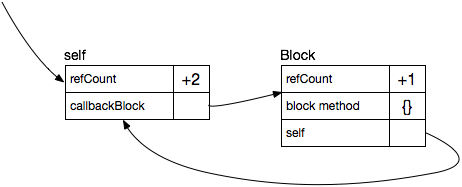
Basically the block holds a pointer to self, and self holds a point to the block. If we then free self, the reference count from the reference holding self is decremented by 1, but the self object and the block object–because they hold references to each other–are never freed:
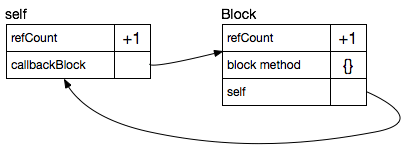
Memory is leaked–and if self is something complex (like a UIViewController), a lot of memory is leaked.

Oh, but I break the retain cycle in my code by expressly deleting the reference to my block when I’m done with it!

Yeah, because your code is bug free. (Sheesh)


Look, “I deal with it in code so it’s no big deal” is a fucking excuse, not a reason.

And it’s an excuse that is dependent on a misunderstanding of the nature of ARC and the retain process. So if you say “but I break the retain cycle in code”, you are a fucking idiot. Well, not a complete fucking idiot–just smart enough to shoot yourself in the foot.

It’s simple, really. The assumption behind ARC is that all allocations are in a tree-like structure of memory references. Things hold other things in a tree-like hierarchy: your UIViewController holds the root view it manages. The root view holds the other views in the hierarchy. The NSDocument object holds the root of the data structures representing your document. And so forth.

By holding references in a strict tree-like structure, it is clear what objects need to be freed when the retain count for a particular object hits zero: everything below it needs to be released. When a view goes away the children views also need to go away. When a block goes away the objects held by that block can be released.

Now of course sometimes we need back references up the tree. And those back references should be handled with weak references; references which do not increment the reference count, but are intelligent enough to be set to nil if the contents are deallocated. (I imagine a linked list of weak references associated with each object, though I’m not entirely sure how weak references are handled.)

This way we don’t get retain cycles.


So what do you do instead of writing

#pragma clang diagnostic ignored "-Warc-retain-cycles"

above your block where the compiler is complaining about a retain cycle?

Simple. Don’t break the cycle in code; that’s just an invitation to a memory leak, and depending on how you try to break the cycle, the cycle may never be broken. (I’m looking at you, AFNetworking.) Break the cycle using a weak reference.

In the example above, this means writing:

__weak MyObject *this = self;
self.callbackBlock = ^{
    [this doSomething];
};

When we create a weak reference cycle what we wind up constructing in memory is this:

That is, while self holds the block, the block holds a weak reference to self. This breaks the retain cycle by preserving the strict tree-like ordering to the hierarchy.

Then, as we free the reference to self:

And as the retain cycle reaches zero in self, it gets freed:
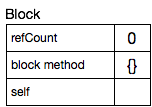
and then the block goes away itself.


So what happens if we have a separate reference to the block?

Well, again, notice the weak reference to self in block, which gets zeroed out.

So if you ever want to be extra cautious you could write:

__weak MyObject *this = self;
self.callbackBlock = ^{
    if (this) [this doSomething];
};

But remember a method invocation on a nil reference is not illegal in Objective C; it simply invokes a nil method which returns nil. So the

if (this)...

is not strictly necessary.


Today’s tl;dr: always break retain cycles when writing block code.

Never use “-Warc-retain-cycles”–even if you think you know what you’re doing. Because the very fact that you’re contemplating breaking a retain cycle in code clearly demonstrates you do not know what you’re doing.


Addendum: One thing I’ve heard developers say is that sometimes you have to break the rules in exceptional cases.

Sure. I’ll buy that. I’ve even done that.

However, your lack of understanding is not an exceptional case. It’s just stupidity.

Retain cycles, or why your iOS app sucks.

One of the reasons why I hate the over-use of third party libraries is that, while in theory it’s “the more eyeballs the better the code”, in practice none of us who use a third party library ever bother to trace bugs into the third party library. It’s because we think that third party library (especially one that has been around for a long time) is somehow “bug free”–when, as we all know, “too many cooks spoil the broth”.

(That is, we’ve seen in practice the more people who work on a software project in a corporate setting, the more likely there are bugs in the source kit, as different developers with different levels of aptitude work on the same source kit to varying results, often unchecked by his peers as most software projects are just too big for everyone to understand. So why is this different with third party libraries?)

In my case I managed to trace down a bug.

Let’s put it this way:

If, in your source kit, you have something like this:

#pragma clang diagnostic ignored "-Warc-retain-cycles"

You have a really bad memory leak bug which affects Every. Single. Fucking. App. that uses your code.

Now I’d forgive this if we’re talking about a small project and the person working on it wasn’t all that established in the community.

But this is a big honking library which is used by a lot of companies, where there are tutorials floating around on sites like NSHipster and Ray Wenderlich, and is often the very first library everyone wants to include that may engage in any sort of networking operations.


The good news is that 3.0 of AFNetworking did away with the problem.

The bad news is that 2.0 of AFNetworking has the problem in spades.